Software for Indexing: A Guide for Modern SEO
Your team updates the website, tightens title tags, publishes stronger product pages, and still sees AI tools describe your brand in ways that feel outdated, incomplete, or just wrong. Marketing assumes the content problem is solved because the words are live on the site. Search systems and AI systems often disagree.
That gap usually isn't about writing quality alone. It's about whether your information is easy to find, organize, and retrieve. In practice, that means indexing.
For marketers, software for indexing used to sound like a backend concern owned by IT or search engineers. It isn't anymore. If search engines, internal site search, customer support bots, and AI systems can't reliably locate the right version of your content, your brand visibility becomes unstable.
Why Your AI Answers Are Wrong and Indexing Is the Fix
A familiar scenario: a brand team launches a new positioning page, updates product messaging, and refreshes pricing language. A week later, someone asks an AI assistant about the company and gets a stitched-together answer based on old pages, vague third-party mentions, and partial facts. The marketer's first reaction is usually, "But we already published the right content."
Publication isn't the same as discoverability.

The confusion gets worse because people use the word "indexing" to mean different things. Industry guidance from ANZSI notes a split between software used to compose and format book-style indexes and products used for embedding index terms in technical documentation and search applications, and that distinction is often blurred even though the workflows and outputs are very different in ANZSI's software for indexing guidance.
The indexing problem marketers actually have
Marketing teams usually don't need back-of-book indexing software. They need the retrieval kind. They need the systems that help search tools, crawlers, and AI-adjacent workflows understand:
- What content exists
- Which pages are current
- How topics relate
- Which terms map to which concepts
- What deserves prominence when someone asks a question
If your site is a storefront, indexing is the shelving system, aisle map, and inventory database combined. Without it, customers wander. AI does too.
Practical rule: If a machine can't quickly tell what your best answer is, it'll assemble a weaker one from whatever it can find first.
This is why structured content work matters so much. Teams already improving structure and schema for AI Overviews are moving in the right direction because they make information easier for machines to parse, classify, and retrieve. The same principle also helps explain why ChatGPT doesn't give the same answers to everyone. Different retrieval paths and context windows can surface different versions of your brand.
Why this has become a marketing issue
Backend indexing now shapes frontline perception. It affects whether your help center appears in chatbot answers, whether your product taxonomy supports AI summaries, and whether your latest messaging has any chance of outranking stale mentions.
That's why indexing belongs in brand visibility planning now. Not because marketers need to become search engineers, but because the quality of your indexable content directly affects how search and AI systems represent you.
What Exactly Is Indexing Software
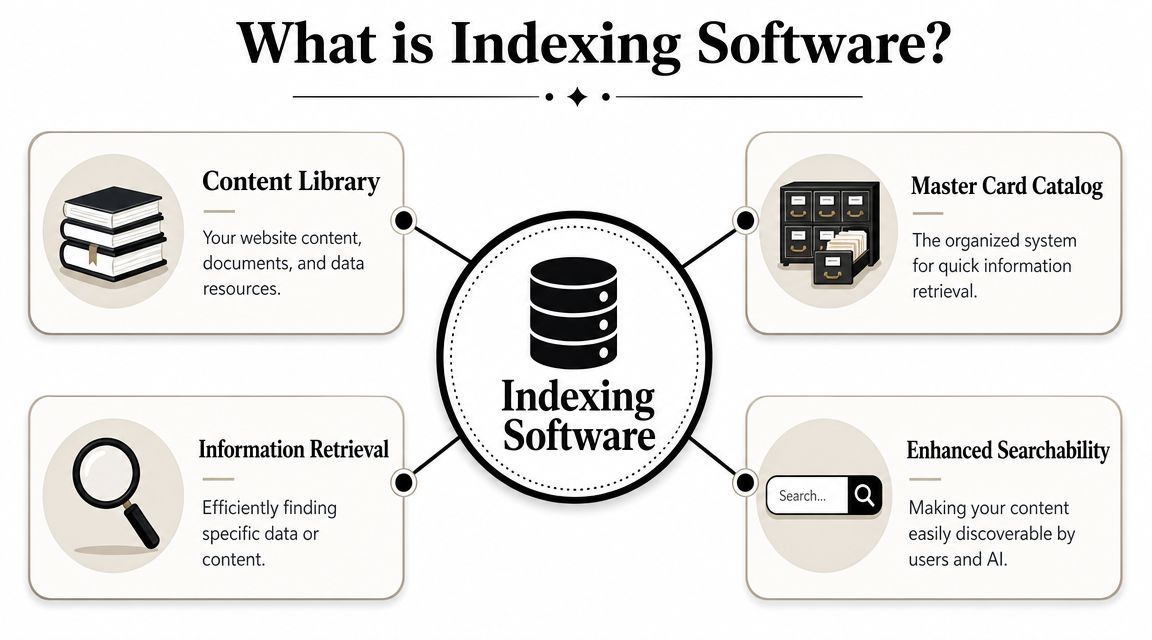
If your website, docs, PDFs, product records, and help articles were all books in one giant library, indexing software would be the master catalog. It doesn't just store the books. It creates the system that tells a machine where information lives and how to retrieve it quickly.
That's the simplest way to understand software for indexing. It scans content, extracts useful signals, and stores them in a form built for fast lookup.
What it does behind the scenes
A good indexing system usually performs a few core jobs:
- It reads content sources such as web pages, document repositories, product databases, transcripts, or image-based files.
- It extracts fields and text like titles, headings, metadata, keywords, categories, and full document text.
- It organizes that material into a searchable structure.
- It returns relevant results fast when a user or system asks a question.
That may sound abstract, but you've already seen the output. Every useful site search bar depends on some form of indexing. So does document retrieval in a knowledge base. So do many AI-connected search experiences.
A related area is document processing. Teams comparing ingestion and extraction workflows often look at OCR, field extraction, and classification together with indexing. A practical overview appears in DigiParser's document processing software guide, especially for teams dealing with forms, invoices, and mixed document types before those files ever become searchable.
Why the concept is older than many marketers realize
This isn't a brand-new AI invention. A historical milestone came much earlier. In a 1996 D-Lib Magazine article about the Library of Congress American Memory collections, the INQUERY retrieval engine was described as powering search on the web, and the article states that “to date, INQUERY has been used to index all text associated with the historical collections available over the World Wide Web” in the original D-Lib article on indexing the American Memory collections.
That matters because it shows indexing software was already supporting large public collections on the web by the mid-1990s. This wasn't a toy feature. It was infrastructure for real discovery.
Later, as websites, archives, and enterprise repositories expanded, indexing became more specialized. Some teams needed fast keyword retrieval. Others needed entity extraction, semantic lookup, or OCR-driven classification. The marketing implication is simple: your content has never competed only on quality. It has always competed on retrievability.
A quick visual helps make that concrete:
For a broader marketing-friendly explanation of how searchable structures work online, this short piece on what web indexing is is useful background.
Inverted vs Vector Indexing Architectures
Once you understand what indexing software does, the next question is how it stores meaning. Two architectures dominate modern retrieval conversations: the inverted index and the vector index.
An inverted index is the classic workhorse. A vector index is the newer architecture behind many semantic and AI search experiences. They solve related problems in different ways.
Inverted indexes find matching words
Think of an inverted index as a very disciplined dictionary. It maps terms to the documents that contain them.
If someone searches for "enterprise SEO platform," an inverted index helps the system find documents containing those exact or closely related terms. That's why it's strong for direct keyword matching, filtered search, product catalogs, and traditional website search.
It answers questions like:
- Which pages contain this phrase
- Which documents mention this term
- Which records match these filters
This method is fast, explainable, and reliable when users know the words they want.
Vector indexes find related meanings
A vector index behaves more like a map of concepts. Instead of focusing only on exact terms, it stores content in a way that helps the system locate semantic neighbors.
That matters when the user doesn't phrase a query the same way your brand does. Someone may search for "tools that show how AI describes my company" while your page talks about AI visibility, model sentiment, and source attribution. A vector-based system has a better chance of recognizing those as related ideas.
Good semantic retrieval doesn't replace keyword retrieval. It reduces the chances that exact wording becomes a gatekeeper.
NISO describes modern indexing workflows where users can browse linked indexes, highlight text to see corresponding index entries, and run searches that return both index entries and full-text results with snippets in NISO's discussion of standards and indexing. That's a useful reminder that the strongest systems often combine approaches rather than picking one dogmatically.
Side-by-side comparison
| Attribute | Inverted Index | Vector Index |
|---|---|---|
| Core logic | Maps words to documents | Maps meanings to related content |
| Best for | Keyword search, filters, exact-match retrieval | Semantic search, concept matching, AI retrieval |
| User query style | "Find this term" | "Find content about this idea" |
| Strength | Precision and speed for known terms | Relevance when wording varies |
| Weakness | Can miss relevant content with different phrasing | Harder to interpret and tune for some teams |
| Marketing use | Site search, taxonomy pages, exact product lookup | AI search, question answering, topic-level discovery |
Why marketers should care
This isn't just a technical architecture choice. It changes what gets found.
If your content strategy depends only on exact-match language, you'll perform better in old-style retrieval than in concept-driven environments. If your information architecture also supports semantic relationships, synonyms, topical grouping, and clean entity signals, you're better positioned for AI-mediated discovery.
For a plain-language look at how these systems overlap with AI retrieval behavior, this overview of the LLM search engine model helps connect the architecture to real user experiences.
Common Use Cases for Indexing Software
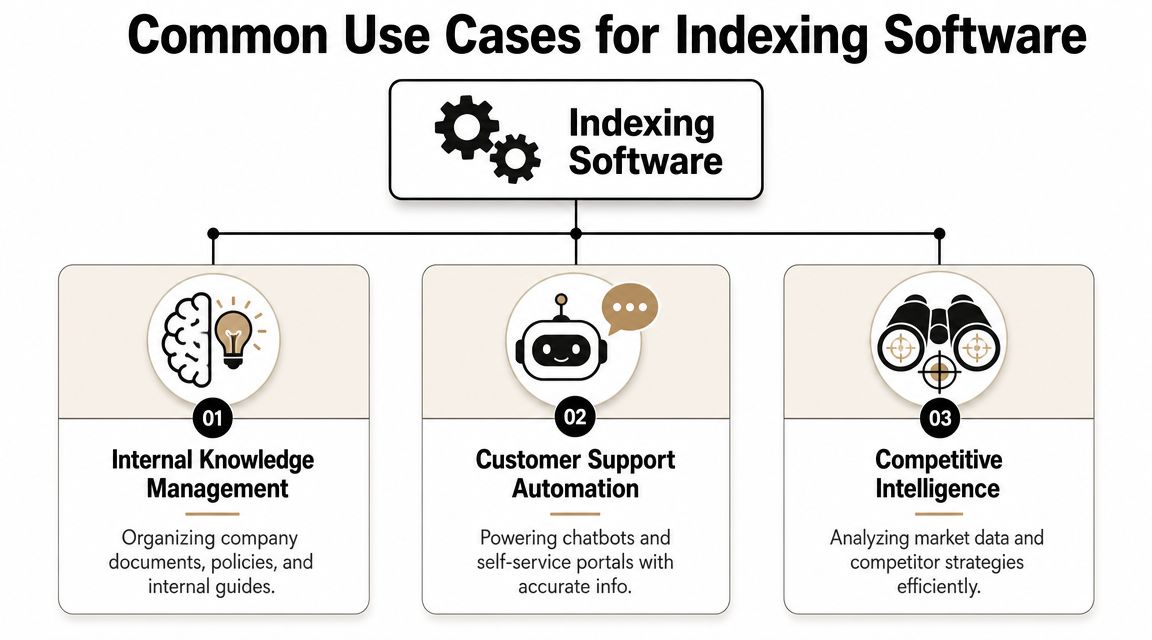
Initial encounters with software for indexing often happen through a search box. That's only one use case. In practice, indexing shows up in very different workflows, and each one teaches marketers something about visibility.
Website and ecommerce search
A visitor lands on your site with intent but limited patience. They type "returns policy," "pricing for teams," or "black leather office chair." Search feels simple to the user because indexing has already done the heavy lifting.
When indexing is weak, the experience falls apart fast. The wrong filters appear. Relevant pages don't rank. Similar products bury each other. Support articles never surface.
For marketing, this is more than conversion hygiene. It's message control. A well-indexed site search environment helps users find the exact language you want associated with your brand.
Internal knowledge and customer support
A second use case sits inside the company. Sales teams search battlecards. Support teams search troubleshooting docs. Product marketers search launch notes and approved positioning.
When those systems fail, people invent answers. That leads to inconsistent external messaging.
Automated document indexing helps here because it can pull text out of scanned or image-based files and then categorize them using searchable criteria. Hyland explains that OCR extracts information from images and indexing software applies search criteria, while database-backed autofill can populate multiple index fields from a single key value, which removes retyping and creates richer searchable stores in Hyland's explanation of document scanning and indexing software.
External discoverability for search and AI
The third use case matters most for brand visibility. Public-facing content has to be discoverable not only by human visitors but also by external systems that summarize, cite, and reinterpret it.
That includes:
- Search engines that need clean signals about page purpose and hierarchy
- AI assistants that may rely on indexed web content, cited sources, or retrieved passages
- Content aggregators and data partners that ingest and repackage your information
- Internal AI layers built on your own content repositories
When indexing breaks, visibility doesn't disappear evenly. Systems fill the gap with whatever they can retrieve, even if it's old, partial, or off-brand.
One lesson across all three
The same principle carries through every use case: content that isn't organized for retrieval becomes fragile. Teams often think they have a content problem when they have a findability problem.
That distinction matters. You don't always need more pages. You often need better indexing logic, cleaner metadata, stronger taxonomy, and better alignment between how your team names things and how people search for them.
How to Evaluate Indexing Solutions
Buying indexing software without a framework leads to the usual mistake. Teams choose the tool with the best demo search box and discover later that freshness, governance, or tuning controls are weak.
A better evaluation starts with the retrieval job you need the system to perform. Site search, knowledge retrieval, document classification, and AI-connected content discovery all create different requirements.
Start with scope and content shape
Before comparing vendors, answer two basic questions:
- What are you indexing: website pages, PDFs, help docs, product data, media transcripts, CRM records, or all of the above?
- Who needs retrieval: customers, internal teams, AI systems, or a mix?
Those answers decide whether you need exact-match speed, semantic retrieval, OCR support, permissions control, or deep API access.
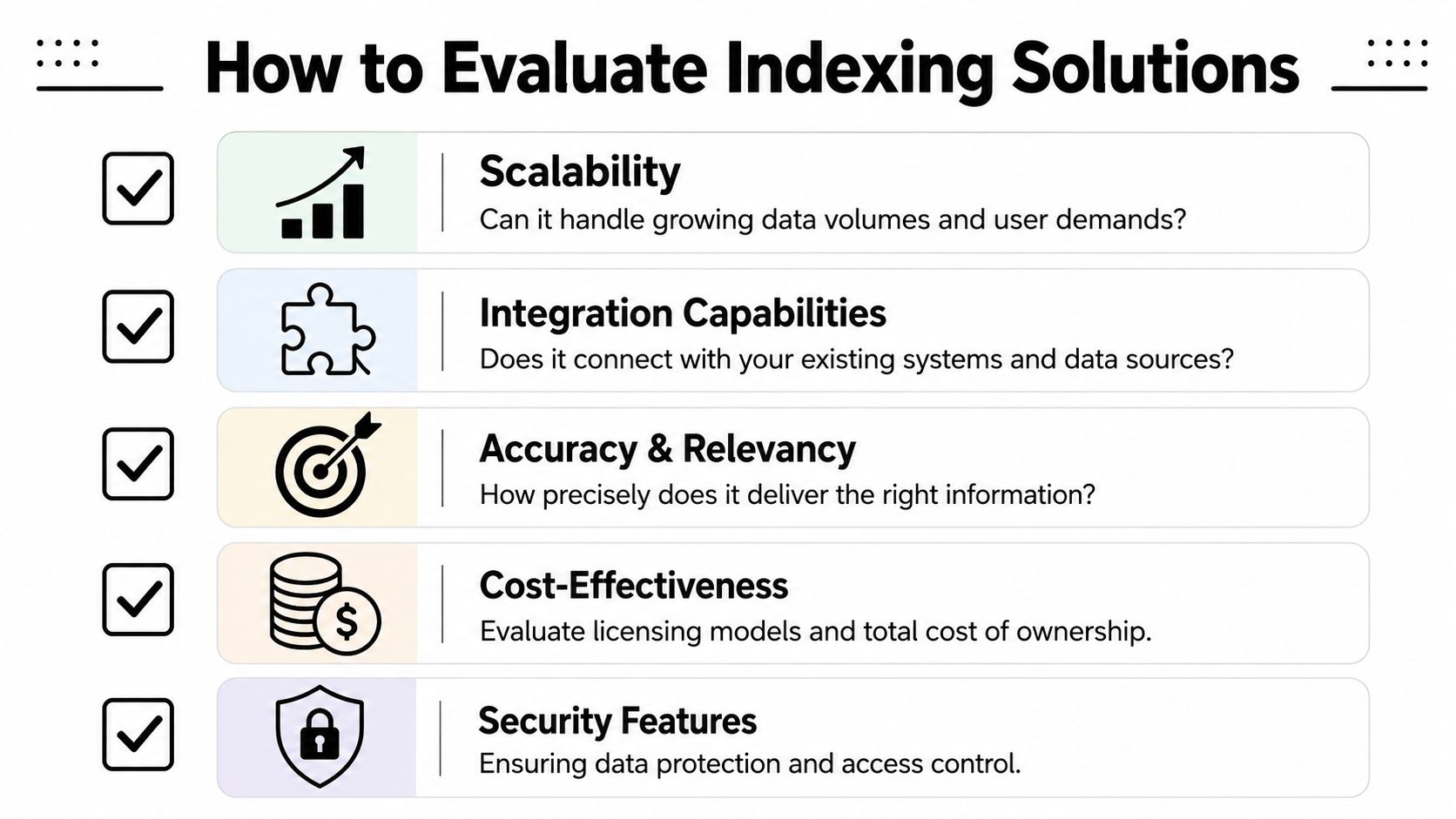
Five criteria that separate solid tools from shiny demos
Scalability
Your current content footprint isn't your future footprint. An index that works on a small help center may struggle once you add multilingual pages, product variants, archived PDFs, and internal docs.
Look for signs that the platform can handle growth in content types and retrieval complexity, not just document count.
Data freshness
Some indexes update in near real time. Others depend on batch schedules. That difference becomes painful when product pages change frequently or support content needs to reflect current policy.
Ask how quickly new or edited content becomes retrievable, and whether you can control refresh behavior by source.
Relevance controls
Search quality isn't magic. Someone needs to tell the system what matters.
Strong solutions let teams tune ranking signals, weight fields, boost strategic pages, demote thin content, and handle synonyms or aliases. Without those controls, the system may retrieve technically relevant but commercially weak results.
Buyer check: If a vendor can't show you how to adjust relevance, you're probably buying a black box.
APIs and integrations
Indexing rarely lives alone. It needs to pull from CMS platforms, file stores, product databases, support systems, and analytics environments.
Ask whether the platform integrates cleanly with the tools your team already uses. Strong API access matters because your architecture will change, and retrieval infrastructure has to adapt with it.
Security and access control
This matters most for internal search and mixed public-private repositories. A useful index that leaks the wrong document is worse than an incomplete one.
Check permission inheritance, role-based access, auditability, and how the system handles sensitive content at ingestion and retrieval time.
A practical scoring sheet
| Evaluation area | What to ask |
|---|---|
| Scalability | Can it handle new content types and larger repositories without a redesign? |
| Freshness | How quickly do updates appear in search or downstream retrieval? |
| Relevance | Can your team tune ranking, synonyms, boosts, and business rules? |
| Integrations | Does it connect to your CMS, DAM, knowledge base, and data layer? |
| Security | Can it enforce access rules consistently across sources? |
One more decision that trips people up
Make sure you're evaluating the right category of software for indexing in the first place. Some tools are built for professional indexers producing book-style indexes. Others are built for document retrieval, search applications, and embedded indexing workflows. If your goal is brand visibility, customer search, or AI retrieval, don't let the shared word "indexing" hide a category mismatch.
The best buying question is simple: What retrieval behavior are we trying to improve, for which audience, using which content? If a vendor can't answer that clearly with you, keep looking.
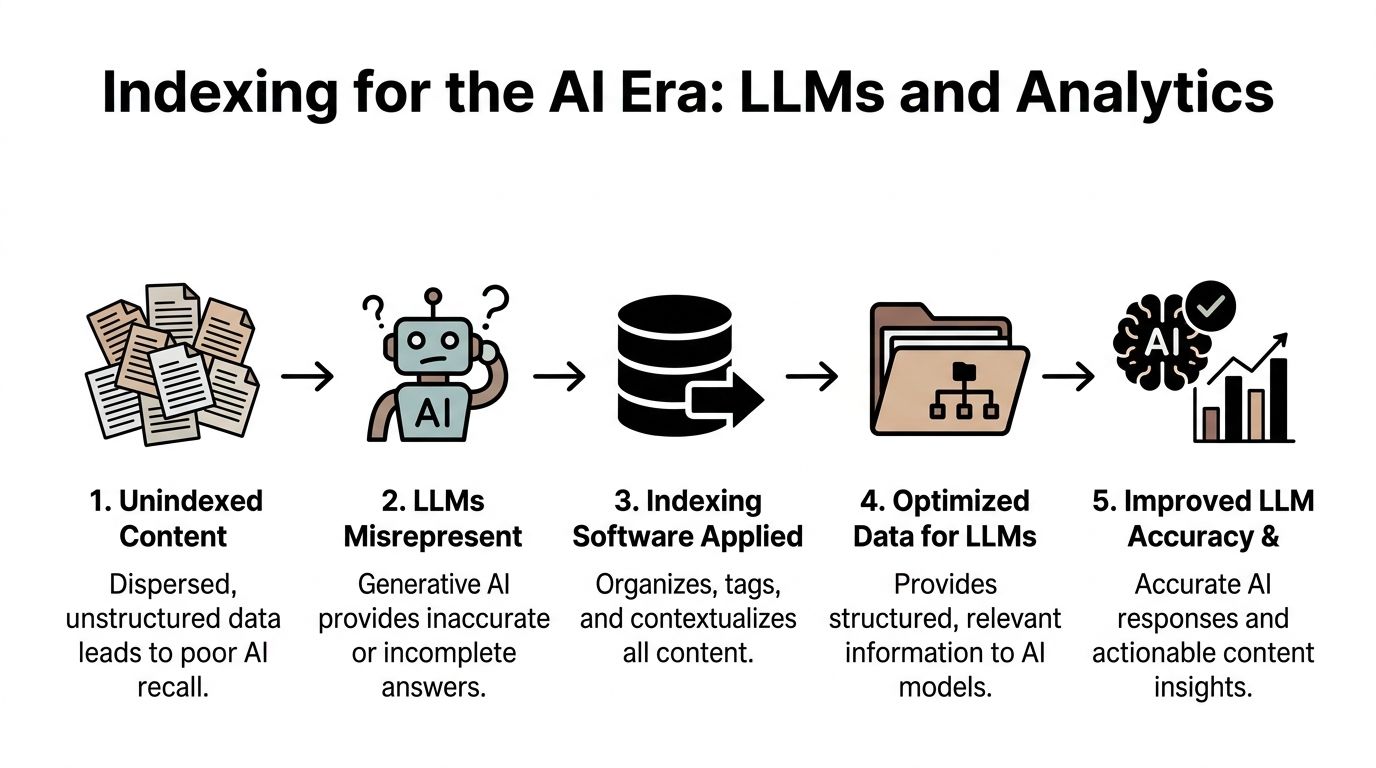
Indexing for the AI Era LLMs and Analytics
Large language models don't experience your brand the way your team does. They don't see your latest strategy deck, hear your positioning meeting, or know which page you wish they would trust. They work from what they can retrieve, interpret, and prioritize.
That changes the job for marketing. Publishing content is only the first step. You also need content that machines can organize well enough to use accurately.
What LLM visibility really depends on
In practical terms, AI visibility improves when your content has:
- Clear structure so systems can separate product facts, definitions, policies, and opinion
- Consistent terminology so related pages reinforce each other instead of fragmenting meaning
- Strong metadata and hierarchy so retrieval systems can infer importance
- Accessible formatting so key passages are easy to extract and cite
- Semantic coherence so concept-based retrieval works even when prompts vary
Backend indexing becomes a strategic lever. If your content repository is well organized, your public content model is cleaner, and your retrieval pathways are stronger, you improve the odds that AI systems represent the brand correctly.
Why analytics belongs in the same conversation
The common approach involves doing the visibility work and then stopping at publication. That's a mistake. AI search is too opaque to manage by intuition alone.
You need to know which prompts surface your brand, how models describe you, what sources they rely on, and where competitors appear when you don't. That's why marketers are paying attention to tools built for this layer of measurement, including platforms focused on AI visibility analytics.
Without measurement, indexing work becomes guesswork. With measurement, teams can compare prompts, identify missing source support, and refine the content and retrieval structures that shape future answers.
The new loop is simple: structure content, improve indexability, observe AI outputs, then fix what the models still get wrong.
The strategic shift
The old mental model treated indexing as plumbing. The current one treats it as influence infrastructure.
If search systems and AI systems are deciding which fragments of your brand to retrieve, summarize, and repeat, then your indexability affects positioning, not just usability. That is why technical content structure, retrieval architecture, and analytics now sit much closer to brand management than was commonly assumed.
Putting It All Together Your Next Steps
The big shift is this: indexing isn't a hidden backend chore anymore. It's part of how your market finds you, how your customers verify you, and how AI systems describe you when nobody from your team is in the room.
That means marketing should treat software for indexing as a strategic dependency. Not because every marketer needs to configure search infrastructure personally, but because brand visibility now depends on retrieval quality.
A useful next-step checklist looks like this:
- Audit your public content for outdated, duplicated, or weakly structured pages
- Review your taxonomy so products, use cases, and categories follow clear naming rules
- Test your search experiences across your site, help center, and internal knowledge systems
- Check machine readability in headings, metadata, schema, and page layout
- Monitor AI representation so you can see where your brand is being summarized inaccurately
If you want a broader framing of how this changes organic strategy, PressBeat's overview of how generative AI impacts SEO is a helpful companion read.
The teams that win won't just publish more content. They'll build content systems that are easier to index, easier to retrieve, and easier to trust. Then they'll measure whether those improvements change how AI and search systems talk about the brand.
If your team needs a way to track that feedback loop, promptposition helps you monitor how major AI models present your company, which sources they rely on, and where your visibility lags behind competitors. It's a practical way to turn AI search from a black box into something your marketing team can measure and improve.