Add a Website to a Search Engine & AI: A Full Guide
Most advice on how to add a website to a search engine is stuck in an older SEO era. It treats indexing like a form you submit once, then move on. That’s incomplete.
A live website isn’t automatically a visible website. Search engines still need to discover, crawl, process, and keep revisiting your pages. AI systems add another layer. Even if Google knows your pages exist, that doesn’t mean ChatGPT, Gemini, Claude, or Perplexity will surface your brand when people ask for recommendations or comparisons.
Marketing teams need a more practical view. You’re not just trying to get a homepage into Google. You’re building a repeatable visibility system across traditional search and AI-driven answers.
Beyond Submission Why Indexing Is a Continuous Process
The old version of this job was simple: publish pages, submit a site, wait. That mindset breaks fast on modern websites. Product pages change, blog archives expand, redirects pile up, and staging mistakes leak into production.
Search visibility starts with three distinct stages: crawling, indexing, and ranking. Search engines first discover a URL, then decide whether to store it in their index, then decide where it belongs in results. If a page never reaches the index, it can’t rank. That basic sequence still matters, and it’s worth revisiting if your team needs a refresher on web indexing fundamentals.
A lot of teams assume search engines will find everything through links eventually. Sometimes they do. But "eventually" is a bad operating model when you’re launching a new site, publishing time-sensitive content, or recovering from a migration.
The practical shift is this: indexing isn’t a one-time setup task. It’s an ongoing operational discipline.
Practical rule: Treat indexation like site health, not like a launch checklist.
That matters even more because search is no longer the only discovery layer. Traditional engines still drive the bulk of search behavior, but AI assistants increasingly summarize, synthesize, and recommend based on underlying web sources. If your content is missing, blocked, outdated, or weakly structured, you lose twice. First in search results, then again in AI answers.
What works is proactive control. Verify ownership. submit sitemaps. monitor crawl status. fix blockers fast. review how key pages are rendered and classified. Then keep doing it after launches, redesigns, and content updates.
What doesn’t work is assuming a sitemap alone solves visibility. A sitemap can help crawlers start. It can’t force indexing, correct poor canonical signals, or make thin pages look authoritative.
Establishing Your Digital Handshake with Search Engines
Ownership verification is the first real step. Until you prove control of the domain, Google Search Console and Bing Webmaster Tools won’t give you the reports, submission features, and error visibility you need.
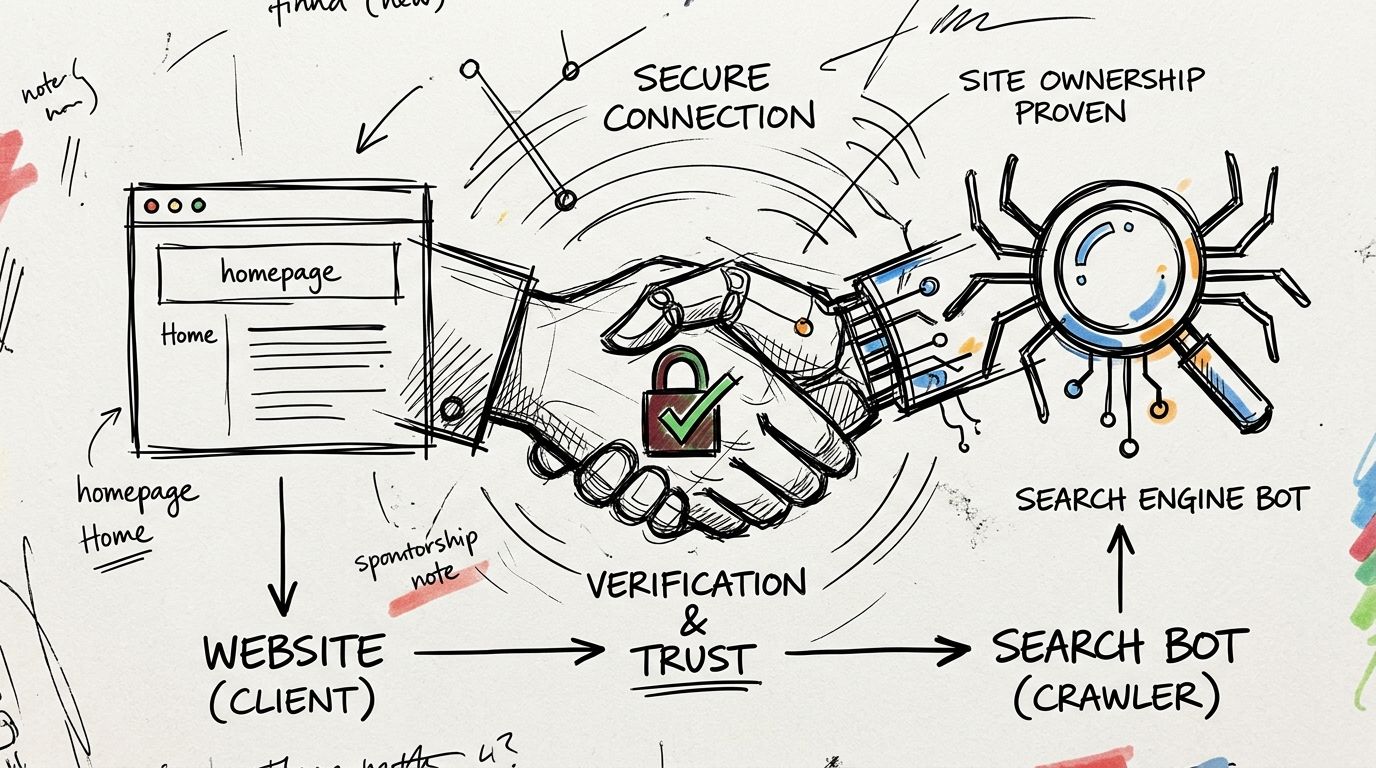
Google formalized manual submission with the launch of Search Console in 2006. Its adoption is tied to meaningful SERP advantages. 72% of first-page Google results use structured data, and that markup can boost click-through rates by up to 30% according to SEO Sherpa’s search statistics roundup.
Pick the verification method your team can maintain
There are a few standard methods, and the best choice depends on who controls your stack.
- HTML file upload works well when your web team can place a file in the site root and leave it there. It’s simple, visible, and easy to audit later.
- HTML meta tag verification is often the fastest option for CMS-driven sites. It’s handy for marketers using WordPress, Shopify, or similar platforms, but it can disappear during theme updates if nobody documents it.
- Domain provider verification is usually the most durable choice for organizations with IT support. It validates the domain at a broader level, which helps when multiple subdomains or protocol variations are in play.
Generally, Google Search Console should be the first setup, and Bing Webmaster Tools should follow right after. Bing matters directly, and it also matters indirectly because other engines and experiences can rely on Bing’s index.
A useful side benefit of this setup is that it forces better documentation. The team has to decide who owns verification, where records live, and who gets alerts. That sounds administrative, but it prevents a common problem: an SEO account tied to one former employee and no one else can access the property.
Verification unlocks the work that matters
Once verified, you can submit sitemaps, inspect URLs, review indexing issues, and catch structural problems before they spread. You also create the foundation for structured content management, including implementation approaches related to LLMs.txt guidance for AI-facing content.
Teams that want a visual walkthrough can use this quick explainer before diving into the platforms.
A clean verification setup usually follows this pattern:
- Claim the main domain first. Avoid starting with only one folder or one marketing subdomain if the business publishes across several properties.
- Add shared access deliberately. Give SEO, web, analytics, and paid media leads the right level of visibility.
- Document the method used. If the site is redesigned later, your team shouldn’t have to rediscover how ownership was verified.
Creating Your Website's Roadmap for Crawlers
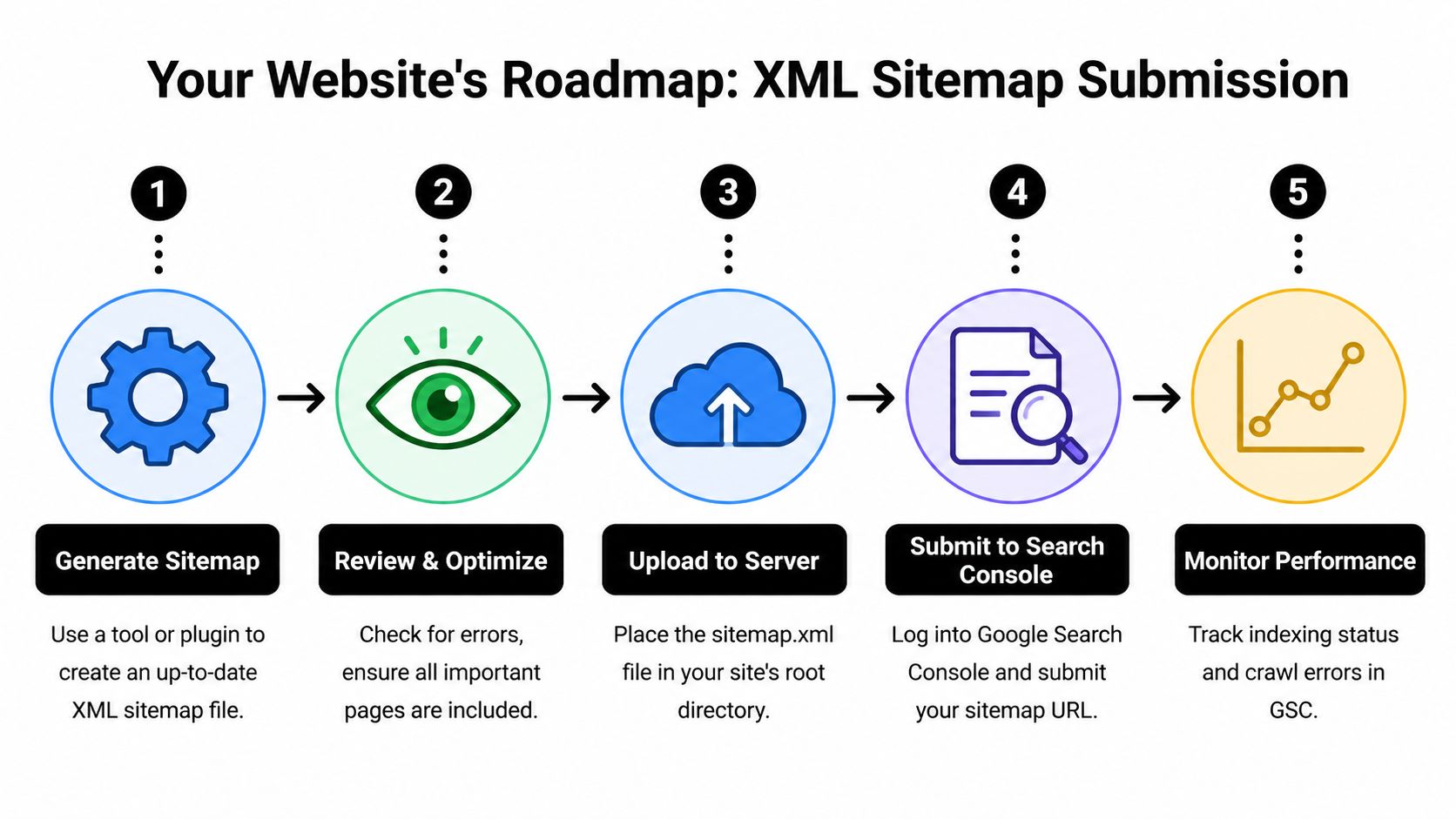
An XML sitemap is still the fastest, simplest way to help crawlers understand what matters on your site. For new domains especially, it removes guesswork.
XML sitemap submission through Google Search Console is the fastest path to indexation for new sites. Google can begin processing a submitted sitemap immediately, and manual submission can trigger crawl initiation within hours, while waiting for organic discovery can take far longer, as outlined in Artistic Bird’s guide to adding your website to Google Search.
What your sitemap should include
A strong sitemap is selective. It should contain pages you want indexed.
That usually means:
- Core commercial pages such as product, service, category, and pricing pages
- High-value editorial pages including blog posts, guides, case studies, and resource hubs
- Canonical URLs only so you don’t send mixed signals about duplicate or alternate versions
- Freshly updated content because regularly maintained pages deserve faster revisit patterns
What shouldn’t go in the sitemap is just as important.
- Thin utility URLs like internal search results, filtered parameter combinations, or duplicate tag pages
- Blocked or noindexed pages because that creates conflicting directives
- Redirecting or broken URLs which waste crawl attention and muddy reporting
A sitemap is a list of preferred destinations, not a dump of every URL your CMS can generate.
If you’re using WordPress, plugins like Yoast SEO or Rank Math usually generate sitemap files automatically. On custom stacks, the development team may need to generate the XML output directly from your CMS or database. Either approach is fine if the file stays current.
Robots.txt can help or hurt
Your robots.txt file acts like a traffic controller. It doesn’t guarantee indexation, but it strongly influences what crawlers spend time on.
Here’s the practical balance:
| Area | Better approach | Risky approach |
|---|---|---|
| Important pages | Allow crawling clearly | Accidentally block folders with key templates |
| Low-value sections | Limit crawler access where appropriate | Block pages that need to be seen for index decisions |
| Testing environments | Keep them isolated from launch plans | Reuse staging rules on the live site |
The biggest errors are usually simple. Someone blocks a directory during development and forgets to remove it. Or the team uses robots.txt when they really mean to control indexation with page-level directives.
If your team wants a deeper Search Console workflow after submission, IntentRank's GSC SEO insights are a useful companion read. For the actual mechanics of sitemap submission, this walkthrough on how to add an XML sitemap to Google is a practical reference.
The submission routine that works
For most marketing teams, the most reliable routine is short:
- Generate or confirm the sitemap.
- Review it for junk URLs and broken logic.
- Place it in a predictable location.
- Submit it in Search Console and Bing Webmaster Tools.
- Recheck after major releases, template changes, or taxonomy updates.
Accelerating Indexing with Submission APIs
Sitemaps are the baseline. APIs are the fast lane.
They’re not necessary for every site, and they’re not a replacement for sound technical SEO. But for teams publishing pages where timing matters, APIs can reduce the delay between publishing and crawler attention.

When APIs make sense
Google’s Indexing API and Bing’s content submission options are most useful when page freshness has business value. Think job listings, live event pages, rapidly updated inventory, or breaking content that loses value if crawlers arrive late.
For a standard brochure site or a blog with a moderate publishing cadence, the overhead usually isn’t worth it. Verification, clean sitemaps, strong internal linking, and normal crawl paths are often enough.
A simple way to decide is to ask one question: if a key page isn’t crawled quickly, does the delay hurt revenue, operations, or campaign timing?
If the answer is yes, API-based submission may belong in your stack.
Hybrid indexing beats all-or-nothing thinking
The strongest setup is usually hybrid.
- Use sitemaps for broad coverage. They remain the durable source of truth for the full site.
- Use APIs for priority URLs. Push the pages that need attention immediately after publish or update.
- Keep internal links strong. Search engines still rely on site architecture to judge importance and discover context.
Don’t route every URL through an API just because you can. Reserve fast submission for pages where speed changes the outcome.
There’s also a governance advantage here. API submission forces teams to define what counts as a priority URL. That’s healthy. It prevents the SEO process from turning into a blanket request for every page, every time.
What teams often miss
The technical setup is only half the work. The main challenge is operational.
Your CMS or publishing workflow needs to notify the API when a relevant page is created, updated, or retired. If developers wire it once and never revisit it, the process drifts. Content teams change templates. New content types appear. The trigger logic stops matching reality.
For that reason, API indexing works best when SEO, engineering, and content operations agree on three things: which URLs qualify, what event triggers submission, and how failed requests are monitored.
If your team can’t maintain that loop, stick with clean sitemap management and consistent crawl monitoring. It’s better to execute the basics well than to bolt on an advanced feature nobody owns.
Diagnosing and Fixing Common Indexing Blockers
Most indexing failures don’t come from search engines being mysterious. They come from ordinary launch mistakes.
A redesign is where this shows up hardest. The new templates look cleaner, content teams are excited, redirects are rushed at the end, and someone assumes the index will sort itself out after launch. Then important pages disappear or stall.
According to a 2025 SEMrush study, 62% of site migrations suffer 20% to 50% traffic drops lasting up to 12 weeks, and Bing re-indexation can lag Google’s by 2 to 3x, which is why HostPapa’s migration SEO guide stresses careful monitoring across engines.
The redesign mistakes that cause the most damage
The pattern is familiar.
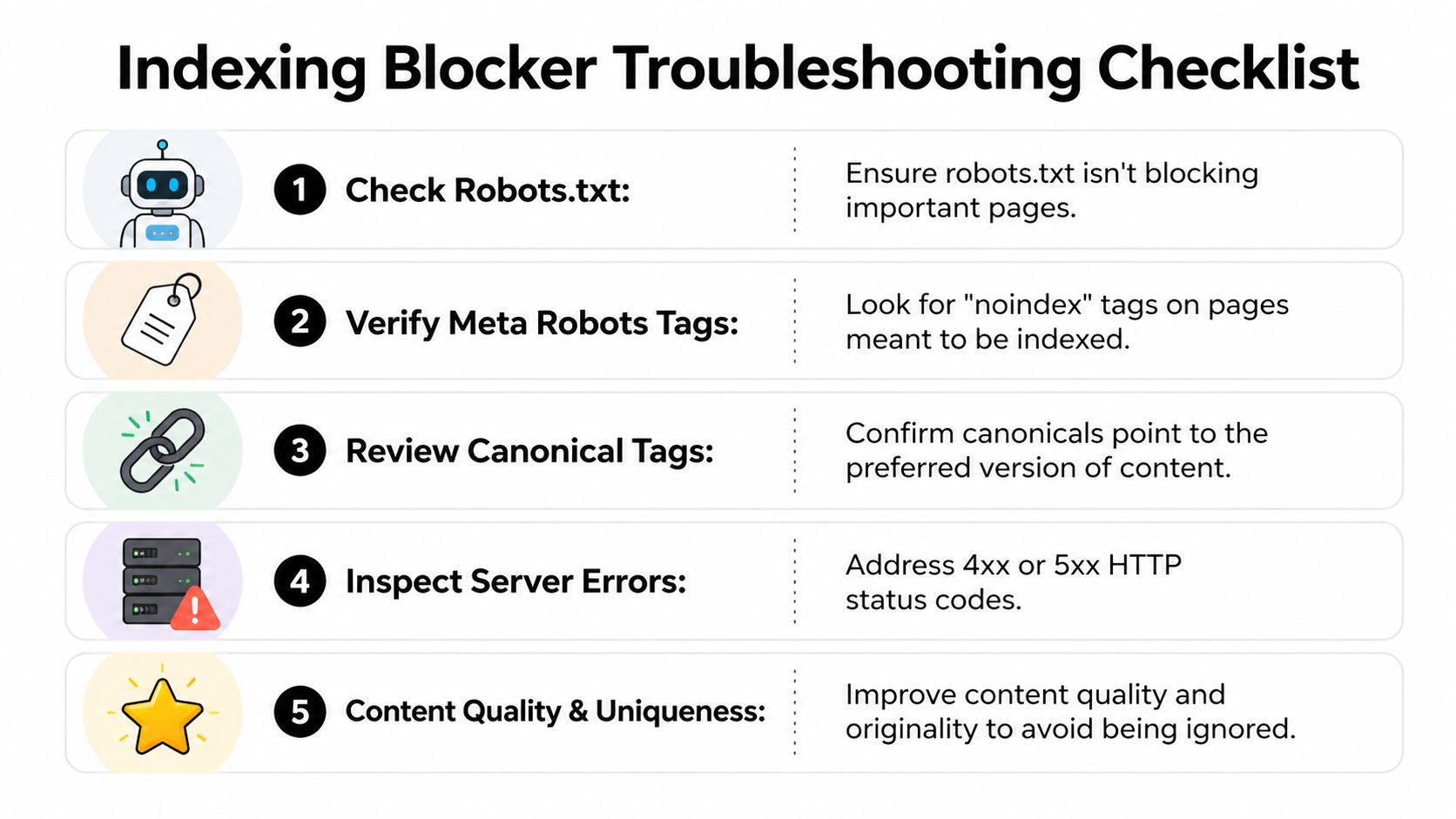
- Noindex left on live templates. A developer adds a temporary tag in staging, then the same directive ships to production.
- Redirect chains and broken mappings. Old URLs don’t resolve cleanly to the best new destination.
- Canonical confusion. New pages point to the wrong preferred version, often back to retired URLs.
- Robots.txt overreach. Entire directories get blocked to protect test areas, and those blocks remain live.
- Weak page parity. The new site removes content depth, headings, or internal links that previously helped search engines understand the page.
When teams see statuses like "Discovered" or "Crawled" without full indexation, the issue is often one of these. The page exists, but the signals around it are conflicting or low confidence.
A practical recovery checklist
If pages aren’t showing up after launch, work the problem in a fixed order.
- Inspect directives first. Check robots.txt, meta robots, canonicals, and response codes.
- Review redirect maps. Make sure legacy URLs land on the most relevant replacement, not just the homepage.
- Validate internal linking. Orphaned pages are much easier to ignore.
- Resubmit clean sitemaps. After fixes, give Google and Bing an updated roadmap.
- Monitor both engines daily during the volatile period. Google often stabilizes faster than Bing.
The fastest recovery usually comes from removing contradictions, not from repeatedly requesting indexing.
Teams also forget usability diagnostics during migrations. Layout changes, template rewrites, and JavaScript-heavy components can affect how pages are processed. This guide to tracking mobile usability in Search Console is useful when the redesign changed front-end behavior.
For technical governance, one topic worth keeping straight is the difference between crawler blocking and page-level exclusion. This explanation of robots.txt and noindex behavior helps teams avoid using the wrong control for the job.
Monitoring Your Footprint in Search and AI
The most common reporting mistake is treating index coverage as the finish line. It’s only the first checkpoint.
Yes, your team should watch Search Console coverage, submitted sitemap status, and page inspection reports. Those reports tell you whether URLs are entering the system, whether errors are stacking up, and whether important templates are being processed as expected.
But that’s only the traditional search side of visibility.

Why search reporting is no longer enough
As of early 2026, 35% of enterprise brands appear in top AI responses for their core brand queries, compared with 78% visibility in Google SERPs. That 43% gap shows that traditional indexation doesn’t guarantee AI positioning, according to CodeClouders' discussion of search-compatible design and AI visibility. The same source notes a projection that AI search could surpass 50% of queries by 2027.
That changes the job for marketing teams. You can have pages indexed, rankings intact, and still lose discovery when buyers ask an AI assistant for the best vendors, alternatives, or product comparisons in your category.
What modern monitoring should include
A workable visibility model now tracks two layers:
| Layer | What to monitor | Why it matters |
|---|---|---|
| Traditional search | Indexed pages, crawl errors, sitemap processing, rich result eligibility | Confirms technical discoverability and search presence |
| AI search | Brand mentions, competitor mentions, sentiment, cited sources, prompt-level gaps | Shows whether AI systems actually surface your brand |
Many teams need a new vocabulary. If you’re getting up to speed on the concepts, this overview of understanding GEO and AEO is a helpful primer.
If your reporting stops at "indexed," you’re measuring availability, not market presence.
The practical move is to treat AI answers as another search surface that needs observation. Which prompts mention your brand. Which competitors appear instead. Which sources get cited repeatedly. Whether the wording is favorable, neutral, or flawed. Those are marketing questions now, not speculative ones.
A team that monitors both layers can make sharper decisions. They can spot when a page is indexed but not trusted. They can see when a third-party review outranks their own source narrative. They can identify where new content, PR, or documentation is needed to become a more reliable source for AI systems.
If your team wants to measure that AI layer directly, promptposition gives marketing and brand teams a way to track visibility, sentiment, competitor presence, and source citations across major LLMs. It’s a practical next step when Search Console tells you your pages are indexed, but you still need to know whether AI platforms are using your content.