Bing SERP Tracking Setup and Automation for SEO Success

Your team is probably doing one of two things right now. You're either tracking Google obsessively and checking Bing only when a client asks about it, or you're glancing at Bing rankings in a tool but not treating them as decision-grade data.
That gap matters more than many teams admit. Bing isn't just another search engine to spot-check. It now influences classic search traffic, Microsoft surfaces, and AI answer environments that rely on Bing-backed retrieval. If your reporting still treats Bing as an afterthought, you're missing both demand and an early warning system for AI visibility.
Introduction to Bing SERP Tracking
Bing SERP tracking means monitoring how your pages appear in Bing search results over time. At the simplest level, that starts with keyword positions. In practice, it has grown into something much broader: tracking organic rankings, SERP features, device and location differences, and how Bing visibility shapes AI citations.
Bing's importance is easier to see when you look at the market shift. Bing's global search market share reached 4.61% in 2025, up 31% year over year, and it captures over 12% of desktop searches in the US, according to SE Ranking's Bing position tracking analysis. That is large enough to justify its own workflow, especially for B2B, older-skewing audiences, local intent, and enterprise traffic patterns.
What changed is not just search share. Bing results now have downstream effects in AI products tied to Microsoft's ecosystem. That means a page ranking well in Bing can influence whether your brand gets cited, summarized, or ignored in AI-generated answers. Teams that still treat Bing as a low-priority mirror of Google usually end up with blind spots in both SEO and AI search.
A lot of marketers already understand rank tracking in the abstract. If you need a quick refresher on the fundamentals, this overview of what rank tracking is is a useful baseline before you build a Bing-specific process.
Why Bing needs its own operating model
Bing doesn't behave exactly like Google. The feature mix is different. The competition is often lighter. The user base can convert differently. That changes how you should prioritize keywords and how you should interpret position data.
A keyword sitting in position three on Bing can outperform a similar Google ranking if the SERP is cleaner and the audience is better aligned. The reverse also happens. A top ranking can produce weak traffic when images, answer boxes, local results, or AI-generated elements absorb attention.
Practical rule: If you report Bing as a single average position number, you're not really tracking Bing. You're compressing a complex SERP into a metric that hides where clicks go.
What separates useful tracking from vanity tracking
Useful bing serp tracking answers questions like these:
- Which terms move traffic when rankings improve
- Which SERP features push organic listings down even when rankings hold
- Which geographies differ enough to require local monitoring
- Which pages win citations in AI experiences and which don't
- Which competitors own Bing surfaces your team hasn't even been measuring
The teams that do this well don't just collect data. They build a repeatable feedback loop from Bing rankings to content updates, technical fixes, and AI visibility analysis.
What to Track in Bing SERPs
Many teams track only blue-link rankings. That's the fastest way to miss what Bing is showing users.
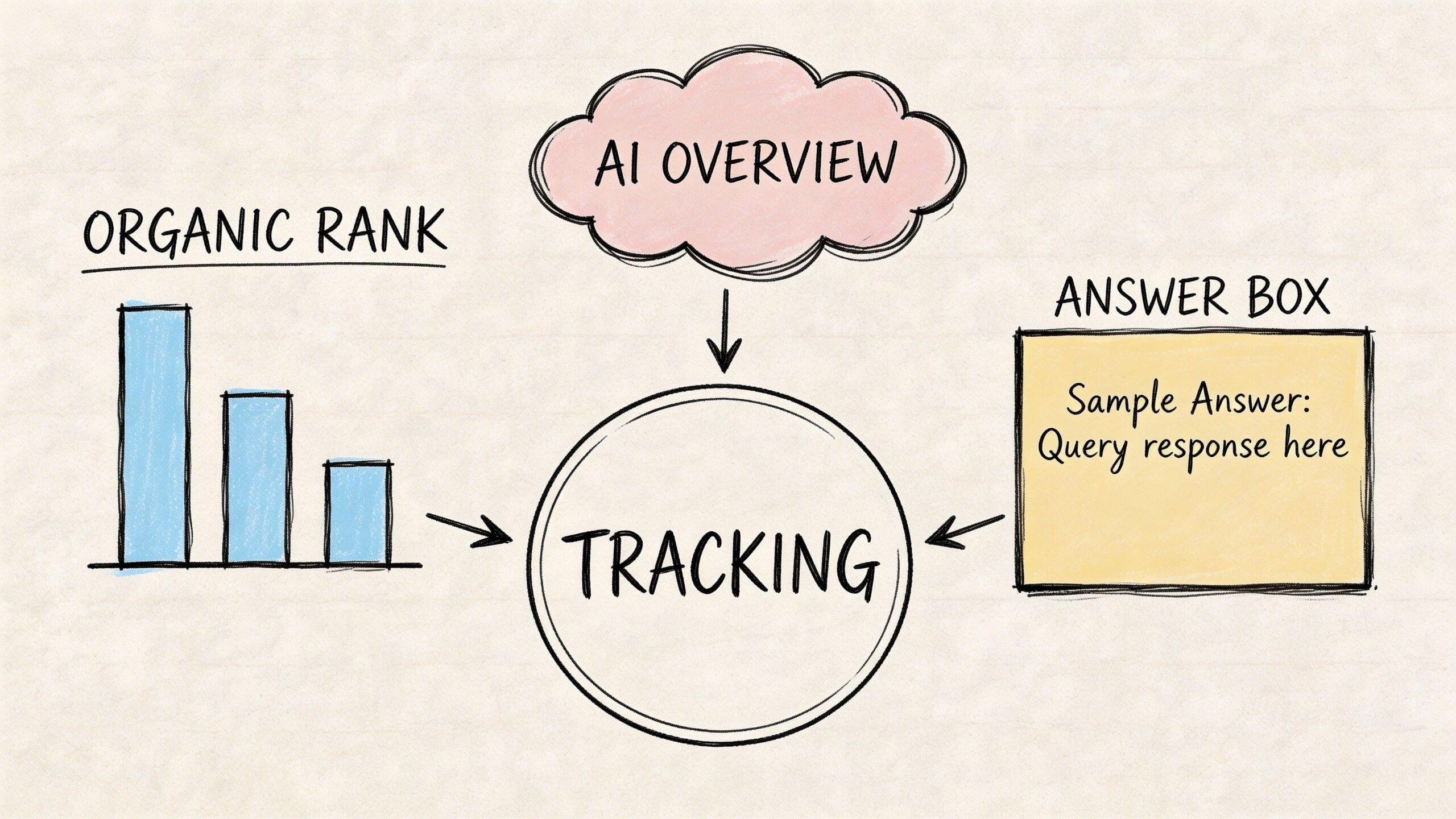
A complete Bing dataset should include classic rank positions, but it also needs feature-level visibility. Bing often blends standard listings with answer modules, images, local results, and vertical-specific elements that can change click behavior fast.
Core rankings still matter
Start with the basics:
- Primary keyword position for your target term
- Landing page assigned to that keyword
- Rank movement over time
- Competitors appearing above or below you
- Device and location context attached to each check
This is still the backbone of bing serp tracking. You need a stable baseline before you can interpret feature impact. But baseline doesn't mean enough.
A keyword in position two may look healthy in a report and still underperform because Bing is showing an answer box above it, an image row midway down, and a local pack that takes the commercial intent.
SERP features worth tracking separately
The most useful Bing tracking setups split features into their own fields rather than burying them in notes.
- Answer boxes matter for informational queries. If Bing resolves the question immediately, traffic to standard organic results often softens.
- People Also Ask style expansions reveal adjacent intent. They can expose content gaps even when rankings look stable.
- Image results deserve explicit tracking for retail, travel, food, publishing, and any product-led category.
- Local map results are critical for location-driven businesses. A strong website ranking won't compensate if the map layer is dominated by competitors.
- Recipe and structured result carousels matter in verticals where rich formatting changes how a result is consumed.
- AI-generated result elements need observation even when reporting is still messy, because they shift attention and citation patterns.
Many standard dashboards fail in this way. They report "position 4" and don't show that the user had to scroll past several visually dominant modules first.
Images and maps are usually undertracked
One of the more overlooked realities in Bing is that visual and local surfaces can carry serious value. Bing Images drives approximately 15 to 20% of e-commerce referrals in major markets like the US and UK, and local map visibility is vital as Bing holds 10 to 12% of global desktop share, as noted in ScrapingBee's Bing rank tracker guide.
That is why image rank tracking and map monitoring shouldn't be side projects.
A few practical examples:
- A retailer may rank well for a product term but lose attention because a visual image strip dominates the upper screen.
- A restaurant group can hold decent organic positions while a weaker map presence limits local discovery.
- A recipe publisher might see impressions without matching clicks because carousel placement determines who gets the first interaction.
Later in your workflow, it helps to watch a walkthrough of SERP interpretation in action:
A practical tracking checklist
If you want a clean minimum viable setup, track these fields for every keyword group:
| Element | Why it matters | What to record |
|---|---|---|
| Organic rank | Baseline visibility | Position, URL, movement |
| Answer box presence | Can reduce organic clicks | Present or absent, owning domain |
| Image visibility | Important for visual intent | Feature presence, asset URL or ranking page |
| Local map presence | Critical for local discovery | Inclusion, business listing, rivals present |
| Structured result type | Changes CTR and screen space | Feature label and owning page |
| Competitor overlap | Shows who owns the SERP | Shared keywords and outranking domains |
Track the SERP the user sees, not the ranking table your tool happens to export.
The business impact of feature-aware tracking
Feature-aware tracking changes decisions. It tells you when to improve schema, when to create image-first assets, when a location page needs work, and when a keyword is no longer worth treating as pure organic SEO.
Without that layer, teams often "optimize" the wrong page because they don't realize the winning format on Bing isn't a standard article at all.
Setting Up Bing SERP Tracking
There isn't one correct setup. The right approach depends on how many keywords you track, how often you need updates, and whether your team wants ownership of raw data or just a dashboard.
Three models work in practice: manual checks, off-the-shelf rank trackers, and API-based collection.
Start with the manual path if you need a baseline
Manual tracking isn't elegant, but it's still useful for validating assumptions and building a starter list.
Use it when you need to:
- Confirm a few priority keywords before buying a tool
- Spot-check competitors in a new market
- Verify whether a tracking platform is reflecting the actual SERP
- Document feature layouts such as images, maps, and answer modules
A simple spreadsheet goes a long way. Include keyword, target URL, observed rank, date, device, location, detected SERP features, and notes. Add screenshots for keywords where layout matters.
This path breaks down quickly at scale. Manual checking introduces inconsistency, personalization noise, and reporting gaps. Still, it is good for grounding your first decisions.
Tool-based tracking is the fastest operational setup
If you want stable daily monitoring, use a purpose-built rank tracker. Common choices for Bing include SE Ranking, SpySERP, and other platforms that support location settings, device splits, and competitor comparisons.
What good tools do well:
- Scheduled rank collection so your team isn't checking by hand
- Geo-targeting for country or local market views
- Historical trend storage for movement analysis
- Feature detection beyond standard positions
- Exports and integrations for reporting
What they usually don't do well:
- Deep customization of fields and workflows
- Full raw SERP ownership
- Special handling for niche features unless you configure it carefully
- Flexible integration into broader BI stacks
If you're evaluating capabilities, this rundown of rank tracker features is a useful framework for separating "nice dashboard" from "useful operational system.""
API workflows give you control
For agencies, marketplaces, publishers, and in-house teams with BI support, API-based tracking is often the best long-term option.
Providers commonly used for Bing SERP collection include DataForSEO, ScrapingBee, and Zenserp. The appeal is straightforward. You can pull the exact data you want, store it in your own warehouse, and build reporting around your business model rather than a vendor's preset UI.
A lightweight workflow usually looks like this:
- Define your keyword set and required locations.
- Call the SERP endpoint on a schedule.
- Parse organic results and feature blocks.
- Store results in a database or sheet.
- Surface changes in a dashboard or alerting layer.
Here is a simple example structure for a Bing SERP request payload:
| Field | Example value | Purpose |
|---|---|---|
| keyword | running shoes women | Query to track |
| location | United States | Geo context |
| device | desktop | Device-specific result set |
| language | en | Language context |
| depth | top results only | Limits collected output |
And a minimal example in Python-like form:
payload = {
    "keyword": "running shoes women",
    "location": "United States",
    "device": "desktop",
    "language": "en"
}

response = bing_serp_api.fetch(payload)
store(response)
The exact syntax varies by provider, but the structure rarely changes much.
Custom pipelines are worth it when ranking data needs to live beside revenue, CRM, or product data. If your team only needs trend lines, a standard tracker is often enough.
Comparison of Bing SERP Tracking Methods
| Method | Cost | Data Depth | Automation | Complexity |
|---|---|---|---|---|
| Manual checks | Low | Low to medium | Low | Low |
| Rank tracking tool | Medium | Medium to high | High | Low to medium |
| API integration | Varies by usage | High | High | Medium to high |
How to choose the right setup
The decision usually comes down to operational reality.
Choose manual if you have a tiny keyword set and need a temporary benchmark.
Choose a tool if your team wants speed, a clean UI, and low maintenance.
Choose an API if you need any of the following:
- Custom feature extraction
- Data ownership
- Integration with BI dashboards
- Cross-market scaling
- Client-specific reporting logic
- Downstream use in AI or content intelligence workflows
One mistake I see often is teams jumping straight into a custom stack before they know what they want to measure. That usually creates noisy data and weak reporting. Start with a small keyword set, define your business questions, then expand the collection logic.
Baseline before you automate everything
Before scaling, record a clean benchmark set of commercial, informational, branded, and competitor terms. Review those SERPs manually once. You need to know what "normal" looks like before an automated system starts throwing alerts.
That single pass usually reveals the blind spots. Pages ranking but not earning attention. Feature-heavy SERPs that need special handling. Competitors showing up through images or local results instead of standard listings.
Measuring Reporting and Automating Bing SERP Tracking
Raw rank data doesn't help much on its own. The useful part is turning it into a reporting system that tells your team what changed, why it matters, and what to do next.
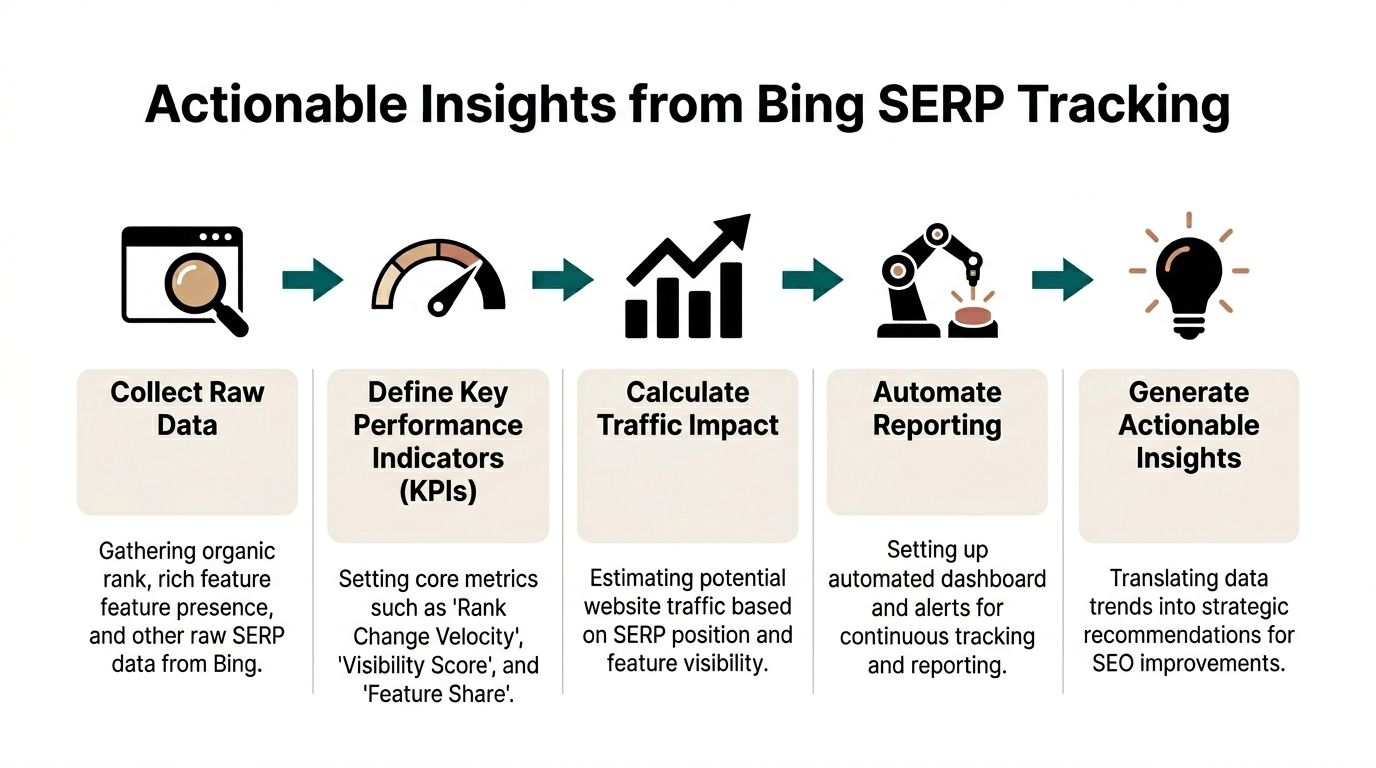
Pick KPIs that explain movement
Most Bing dashboards should include a short KPI layer above the raw tables.
Useful metrics include:
- Rank change velocity for identifying sharp movement instead of slow drift
- Visibility score based on tracked keywords and weighted prominence
- Feature share showing how often your domain appears in answer, image, or local elements
- URL stability so you can catch page swaps and cannibalization
- Traffic potential estimate adjusted for feature-heavy SERPs
Traffic potential matters because top position doesn't always mean top opportunity. If an AI summary, answer box, or image block dominates the first screen, standard CTR assumptions become unreliable.
Accuracy depends on geo, device, and feature handling
Many reports often go wrong in this area. If you don't account for geography, device context, and SERP layout, the data looks neat but misleads the team.
Incorporating geo-targeting, device personalization, and SERP feature detection can cut position errors by 15 to 20%, and sites using structured data see a 22% ranking boost and 14% CTR uplift on Bing, according to SE Ranking's tracking methodology guide.
That has two direct implications:
- Your tracker should segment desktop and mobile rather than blend them.
- Your content team should treat schema implementation as part of ranking operations, not just technical cleanup.
Build a dashboard people will actually use
The best reporting setups are simple enough for weekly review and detailed enough for analysts to drill in. Data Studio, Looker Studio, Power BI, and internal BI layers all work if the model is clean.
A practical dashboard usually includes:
| Dashboard block | What it shows | Why it matters |
|---|---|---|
| Executive summary | Visibility movement and notable losses | Fast review for stakeholders |
| Keyword trends | Rank movement by segment | Finds winners and drops |
| Feature ownership | Images, local, answer box presence | Shows non-blue-link gains |
| Competitor overlap | Who displaced your domain | Prioritizes response |
| Page-level impact | Which URLs changed | Connects action to content |
For teams that want another perspective on tracking and visibility workflows, Serplux is a useful reference point because it helps frame how rank monitoring can be packaged into a cleaner reporting discipline.
Automate the right alerts
Don't send an alert every time a keyword moves one spot. That creates inbox wallpaper.
Set alerts for events that require action:
- Loss of a featured element on a high-value keyword
- Sudden rank drops across a keyword cluster
- A competitor entering tracked SERPs for your priority terms
- Page swaps where the wrong URL begins ranking
- Local or image feature losses for commercial queries
A good alert doesn't say "ranking changed." It says "this change affects traffic or revenue and deserves a response."
Reporting cadence matters
Daily collection is useful for volatile terms, but not every team needs daily stakeholder reporting. A practical rhythm is:
- Daily pulls for collection
- Weekly review for operational decisions
- Monthly summaries for trend discussion
- Quarterly audits for strategy and content planning
If your dashboard becomes too dense, strip it back. Many teams make better decisions from five dependable charts than from forty noisy widgets.
Connect rankings to outcome data
Your Bing report should sit next to analytics, not apart from it. Tie tracked terms to sessions, conversions, lead quality, and page behavior where possible.
If you need examples of what usable output looks like, these search ranking reports show the difference between a report that merely exports data and one that supports action.
The goal isn't perfect attribution. The goal is operational clarity. You want to know which SERP changes are cosmetic and which ones require content, technical, or local SEO work this week.
Integrating Bing SERP Data with AI Search Visibility
Classic Bing tracking is no longer enough on its own. If Bing influences AI answers, then your SEO dataset should help explain why your brand gets cited in one prompt and ignored in another.
Use Bing Webmaster Tools for AI-specific signals
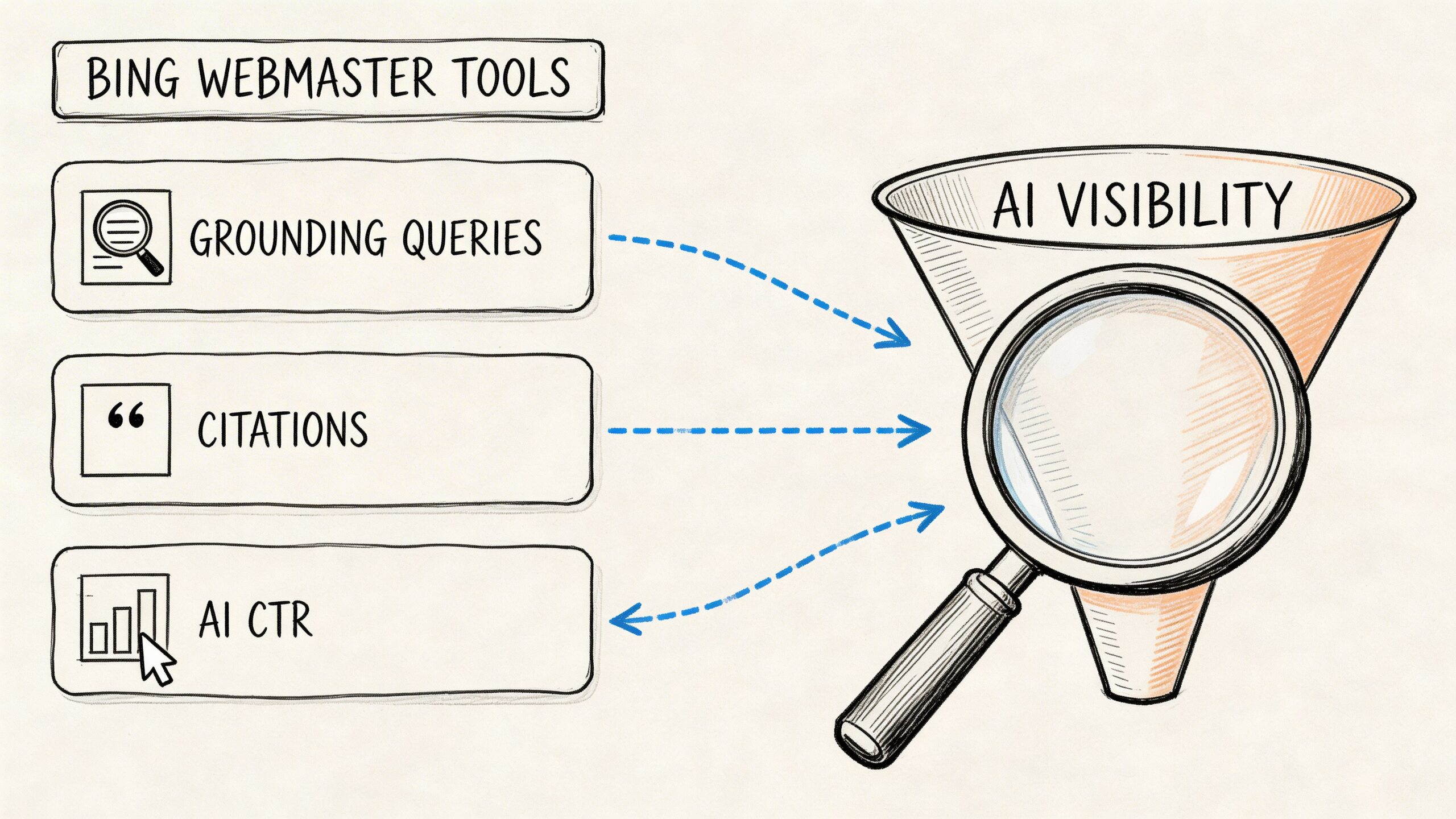
Microsoft's AI Performance reporting gives teams a more direct view into how content appears in Bing-powered AI experiences. The most useful part is not just citation counts. It is the relationship between grounding queries, citations, average position, and click behavior.
The practical workflow looks like this:
- Open the AI Performance report in Bing Webmaster Tools.
- Filter by date range and query type.
- Review impressions, citations, average position, and CTR for AI-generated answers.
- Study grounding queries to see which intents led Bing to use your content.
- Compare that data with analytics segments or tagged landing pages.
This is valuable because grounding queries show the semantic bridge between the user's prompt and the content Bing chose to rely on. That gives you a much clearer optimization target than broad ranking averages.
Citation volume alone is a weak KPI
Teams often celebrate citations without asking whether those citations drive useful traffic or the right brand framing.
That is where the recent shift in referral behavior matters. AI referrals from Bing-powered experiences surged 357% year over year to 1.13 billion visits in June 2025, but citation-to-traffic conversion varies by intent, with optimized sites achieving 15 to 25% conversion, according to this analysis of Microsoft's AI Performance reporting.
The practical takeaway is simple. Don't optimize for raw citation count if the queries behind those citations don't align with business value.
If your content earns citations for low-intent informational prompts, the reporting can look healthy while pipeline impact stays flat.
Turn Bing datasets into AI visibility analysis
Once you have Bing keyword and feature data, you can map it into a broader AI monitoring workflow.
Use a structure like this:
| Input | AI visibility use | What to look for |
|---|---|---|
| Bing keyword rankings | Prompt mapping | Which high-value prompts align with ranking pages |
| Feature ownership | Citation probability context | Whether rich results appear to influence mention rates |
| Competitor overlap | Benchmarking | Which rivals appear more often in AI answers |
| Landing page data | Source tracing | Which pages are reused in citations |
| Brand terms and entities | Sentiment review | How the brand is framed in answers |
A lot of teams benefit from studying adjacent examples first. For software and technical service brands, AI Visibility for Software Development Companies gives a solid lens on how traditional search presence and AI discoverability increasingly overlap.
Review AI outputs the same way you review SERPs
You shouldn't treat AI answers as a black box. Review them the way you would review a SERP: by query cluster, by competitor set, and by source influence.
A practical review process includes:
- Mapping tracked keywords to prompt families rather than matching one keyword to one prompt
- Checking which pages are cited repeatedly across similar prompts
- Noting whether competitors are mentioned more favorably
- Comparing branded and non-branded prompt performance
- Watching for sentiment shifts when rankings change
If your team is still early in this area, this guide to AI search visibility is a helpful framing resource for connecting classic SEO metrics to LLM-facing visibility.
What actually works
The sites that improve AI visibility usually do three things well:
- They align content closely with clear user intent.
- They structure pages so retrieval systems can parse them cleanly.
- They monitor which Bing-visible pages become recurring citation sources.
What doesn't work is chasing broad AI mentions without source-level analysis. If you don't know which Bing-ranked assets are feeding those answers, your optimization cycle stays vague.
Common Problems and How to Fix Them
Bing tracking setups usually fail in predictable ways. The symptoms look random. The causes usually aren't.
Bot blocking and unstable scraping
Symptom: Requests fail, pages return incomplete HTML, or rankings disappear in batches.
Cause: The scraper is too naive. It may be reusing the same request pattern, lacking proxy rotation, or failing to mimic realistic browser behavior.
Fix: Rotate proxies, vary request headers, slow request bursts, and monitor failed fetch logs. If you're using an API provider, review retry behavior and blocked-response handling before blaming ranking volatility.
Geo mismatch
Symptom: Your tracker shows one ranking, but a manual local check shows another.
Cause: The collection point doesn't match the target market closely enough, or the tool is using broad country settings when the query behaves locally.
Fix: Tighten location targeting. Separate national keywords from city-sensitive ones. Validate a sample set manually every reporting cycle.
Device blending
Symptom: Reports look stable, but traffic changes don't match the trend.
Cause: Desktop and mobile were merged into one line. Bing can present different feature mixes by device.
Fix: Split device reporting by default. Treat desktop and mobile as separate environments, not report filters you rarely use.
Feature parsing breaks
Symptom: Image rows, local packs, or answer modules suddenly vanish from reports.
Cause: Bing changed page structure or your parser relied on brittle selectors.
Fix: Keep parsing logic modular. Maintain a fallback extraction layer for feature detection. Run spot checks on the SERPs that matter most rather than assuming the scraper stayed accurate.
Silent data quality issues
Symptom: No obvious errors, but the data gradually stops making sense.
Cause: Quotas, partial responses, schema changes, or storage errors can corrupt trend lines without triggering a visible outage.
Fix: Add simple integrity checks:
- Validate record counts after every collection run
- Log parser exceptions instead of swallowing them
- Compare a small manual sample against tracked outputs each week
- Flag missing fields before they hit dashboards
The worst failures in bing serp tracking are usually quiet ones. Teams keep reporting from a broken pipeline because the charts still load.
Conclusion and Next Steps
Bing deserves its own tracking process. Not because it replaces Google, but because it behaves differently, serves different opportunities, and now feeds visibility in AI-driven experiences that marketers can't afford to ignore.
A solid bing serp tracking workflow does five things well. It tracks real SERP layouts, not just headline rankings. It chooses a setup that fits the team's scale. It reports on changes that matter. It automates collection without automating away judgment. And it connects Bing performance to AI citation patterns.
If you're building this from scratch, keep the first pass narrow.
- Pick a pilot keyword set across branded, commercial, and informational intent
- Track organic plus feature presence rather than rank alone
- Decide whether a tool or API fits your reporting reality
- Build one dashboard your team will review
- Run a monthly quality check on location, device, and feature accuracy
- Add AI visibility analysis once your SERP data is dependable
The teams that benefit most from Bing aren't always the ones with the biggest budgets. They're the ones that stay disciplined enough to measure it consistently and act on what the SERP is really showing.
Treat Bing as a live operating channel, not a backup search engine, and the data becomes much more useful.
If your team wants to connect Bing visibility with how AI systems describe your brand, promptposition gives you a practical way to track that layer. It helps marketing teams monitor AI visibility, sentiment, competitor mentions, and source influence across major models so you can see how search performance translates into AI presence and where to improve next.