The Search Monitor Pricing: A Complete 2026 Cost Guide
A brand manager usually arrives at The Search Monitor after something has already gone wrong. A competitor is bidding on the brand name. An affiliate is ignoring coupon rules. A hotel or retail team notices inconsistent offers showing up in different markets and can’t prove where the violation started. The internal question comes fast: do we need a specialized monitoring platform, or can we patch this with spreadsheets, ad platform alerts, and manual checks?
That’s where The Search Monitor enters the conversation. It has a strong reputation in paid search monitoring, affiliate compliance, and brand protection. The problem isn’t understanding why a tool like this exists. The problem is figuring out what it will cost once your requirements move beyond the basic sales-line summary.
Public pricing gives you a starting point, not a purchasing decision. The search monitor pricing only looks simple if you stop at the first two plans. Most serious buyers can’t. They need to know how keyword limits translate into coverage, when module pricing starts to matter, and which costs are likely to appear only after the demo.
Navigating the Complex World of Brand Monitoring
The most common buying mistake in this category is treating brand monitoring as if it were a single workflow. It isn’t. One team needs to detect unauthorized trademark bidding. Another needs to verify whether affiliates are breaking program rules. A third needs to see competitor ad activity across regions before the sales team starts asking why branded click costs are climbing.
That’s why buyers often start by surveying the broader market before narrowing in on one vendor. If you want a broader view first, Toolradar’s list of top brand monitoring tools is a useful way to see how specialized this category has become. Different tools solve different problems, and that matters when a vendor’s public pricing compresses multiple use cases into a few plan names.
For teams still defining the problem internally, this guide on brand monitoring online is also a practical primer on what to monitor and why the scope tends to expand once the work begins.
The procurement issue with The Search Monitor isn’t that it’s unusually expensive on first glance. It’s that the public pricing can understate the eventual spend for teams that need broader coverage, more specialized intelligence, or operational workflows tied to enforcement. Buyers who only budget for the base subscription often discover later that the actual cost sits in modules, crawling, and the gap between listed plan capacity and actual monitoring needs.
Practical rule: If your business problem spans competitor ads, trademark abuse, and affiliate policy enforcement, don’t evaluate The Search Monitor as one line item. Evaluate it as a stack.
Understanding The Search Monitor’s Core Functionality
A common buying mistake happens early. A team sees The Search Monitor in a shortlist, compares it with rank trackers and paid search tools, and assumes the overlap is large enough to evaluate them on the same budget line. That usually leads to a weak business case, because The Search Monitor is built for monitoring market behavior and enforcing channel rules, not just measuring visibility.

That distinction is important because the comparison set is broader than SEO software. The platform sits between paid search intelligence, brand protection, and affiliate oversight. Teams that are also tracking how visibility shifts inside AI-generated answer surfaces face a related but separate problem, which an AI overview tracker is designed to measure.
Ad intelligence in practical terms
One major function is ad intelligence. Procurement teams should read that as ongoing observation of who appears on your important search terms, what claims they make, and where those ads show up.
The operational value becomes clear once monitoring extends across countries, product categories, or reseller networks. Manual checks may work for a narrow brand list. They break down once different stakeholders need evidence they can act on.
A platform in this category helps answer questions such as:
- Who is showing up on priority terms: Competitors, affiliates, marketplaces, or unauthorized resellers may be buying traffic around your brand.
- What message they are using: Ad copy often reveals pricing tactics, trademark usage, promotional pressure, or channel conflict.
- Where the activity appears: Geo-specific monitoring matters because search behavior and violations are rarely uniform across markets.
This is also where total cost of ownership starts to matter. Broad ad monitoring usually requires more keyword coverage, more locations, and more reporting depth than buyers estimate in the first pass. If your initial model assumes only the base package, the eventual cost can move closer to other specialist monitoring platforms than the entry price suggests.
Brand protection as an enforcement workflow
The second core function is brand protection. Buyers get more value here when they treat the tool as part of an enforcement process, not as a dashboard that collects violations.
Typical use cases include trademark misuse, competitor bidding on protected terms, and reseller behavior that conflicts with pricing or marketplace policies. The practical question is not whether the platform can detect incidents. The practical question is whether legal, ecommerce, paid media, and partner teams have agreed on who investigates, who escalates, and what evidence is sufficient to act.
That governance layer affects cost in a less obvious way. A lower subscription fee can look attractive until your team spends internal hours triaging alerts, exporting evidence, and reconciling findings across channels. Buyers who already evaluate adjacent tools through a total-cost lens, such as comparing analytics QA solution rates, usually make better decisions here because they account for labor, workflow fit, and add-on dependence rather than software spend alone.
Monitoring creates financial value only when alerts turn into faster enforcement, fewer policy violations, or lower wasted media spend.
Affiliate compliance as channel control
The third function is affiliate compliance. This tends to matter more in organizations with partner-heavy acquisition models, coupon ecosystems, or strict bidding rules around branded search.
The point is control. Teams use this capability to identify affiliates that bid where they should not, use unapproved copy, or create pricing inconsistencies that weaken the brand’s own campaigns. In procurement terms, affiliate compliance can justify spend quickly if violations are frequent and commercially meaningful. If they are rare, the module may be useful but harder to defend as part of the initial contract.
Viewed together, these functions explain why The Search Monitor often ends up in a different budget conversation than direct rivals and newer AI search analytics products such as promptposition. The older category solves surveillance and enforcement problems across paid and partner channels. The newer AI-focused tools solve visibility measurement inside answer engines. Some teams need both. Many do not. The smart buying decision starts with that separation, because it determines whether you are paying for a focused monitoring system or building a wider monitoring stack with keyword expansion and add-on modules that raise total ownership cost.
The Search Monitor Pricing Tiers Explained
A common buying scenario starts the same way. A team sees two published plans, plugs $599 or $899 into a budget sheet, and assumes pricing is relatively straightforward. That first estimate is useful, but only as a starting point.
Public pricing references commonly describe a two-tier entry point. Pro is listed at $599 per month for 250 keywords, and Ultimate at $899 per month for 500 keywords. Using those published figures, Pro works out to about $2.40 per keyword and Ultimate to about $1.80 per keyword. Those numbers make the pricing ladder look simple. The procurement question is whether your monitoring design fits inside those keyword caps.
The side by side comparison that matters
| Feature | Pro Plan | Ultimate Plan |
|---|---|---|
| Monthly price | $599 | $899 |
| Keyword coverage | 250 keywords | 500 keywords |
| Average cost per keyword | Approx. $2.40 | Approx. $1.80 |
The immediate conclusion is clear. Ultimate has better unit economics for any team that can use the additional coverage.
That does not mean every buyer should default to Ultimate. It means Pro is efficient only when the monitoring scope is tightly controlled. If the business tracks several brands, product lines, reseller terms, affiliate activity, or regional variants, the lower-priced tier can become a short-term plan that creates a second buying cycle sooner than expected.
Keyword limits look simple. Real monitoring programs are not.
Keyword allowances tend to expand once stakeholders map the actual watchlist. Brand teams want parent brands and product names. Paid search teams want competitor terms and promo modifiers. Channel teams want reseller, affiliate, and marketplace variations. International teams often need duplicate coverage by country or language.
A 250-keyword cap can disappear quickly under that kind of operational demand.
This is significant because the practical cost of The Search Monitor is tied less to login access and more to coverage breadth. A plan can look affordable in isolation and still be expensive if it forces the team to rotate terms in and out of monitoring, accept blind spots, or buy more capacity earlier than planned.
Pro versus Ultimate is really a capacity decision
The jump from Pro to Ultimate is modest relative to the increase in keyword volume. For teams already close to 250 terms, the higher plan can reduce internal triage work and lower the chance that known risk areas go unmonitored.
That is the non-obvious part of the pricing model. The extra spend is not just buying more keywords. It may also reduce operating friction for the people who have to maintain lists, justify exclusions, and respond when a missed term turns into a compliance problem.
For comparison discipline, it helps to look outside this category as well. Trackingplan’s published analytics QA solution rates show how software priced around data loss or control failures often carries a premium over ordinary reporting tools. The same logic applies here. Buyers are paying for surveillance of commercial risk, not just for a dashboard.
It also helps to benchmark The Search Monitor against adjacent categories before treating the published plans as automatically reasonable. A broader review of brand tracking software can help teams separate traditional paid search and compliance monitoring from newer visibility platforms, including AI search analytics vendors such as promptposition. That comparison matters because an enterprise can overspend by buying a specialized enforcement platform when the actual requirement is search visibility measurement, or underspend by choosing an AI visibility tool that does not address trademark abuse, reseller monitoring, or affiliate violations.
Buying lens: The real question is not whether $599 or $899 sounds expensive. The question is whether the keyword ceiling matches the number of terms your organization needs to watch continuously, without creating blind spots or forcing a later expansion.
What the base tiers actually tell you
The published plans answer one narrow question. They show the likely entry cost for a limited deployment.
They do not show the cost of growth, the point at which keyword overages become an issue, or the modules an enterprise team may need once legal, channel, and competitive intelligence stakeholders join the program. That is why a base-tier comparison is useful, but incomplete. For serious buyers, the more important number is total cost of ownership, not the first monthly fee.
Beyond the Sticker Price Uncovering Add-Ons and Hidden Costs
Many software buyers make the same incorrect assumption after seeing Pro and Ultimate. They assume the vendor has a normal tier ladder, and that the rest is optional. The evidence points to something more modular.
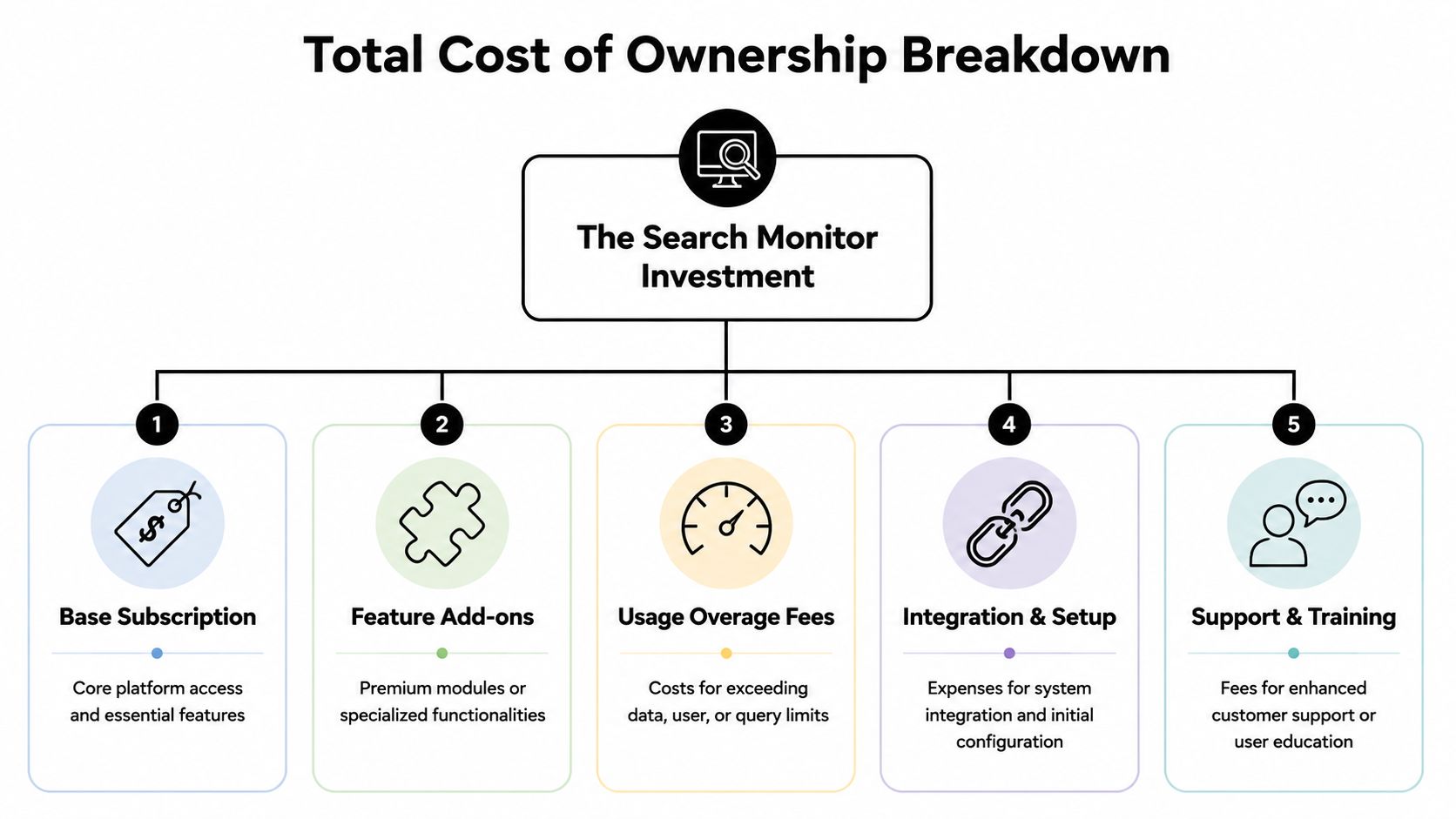
According to FitGap’s 2026 The Search Monitor analysis, enterprise-level pricing goes beyond the base plans. Ad Armor is listed at $1,200 per month plus fees, Lighthouse industry data at $300 per month per vertical, and Brand Protection and SEM Insights both start at $800 per month plus crawling fees. The same analysis also notes that full-platform bundles require custom sales quotes.
The real purchasing model is modular
This is the point where The Search Monitor shifts from a straightforward SaaS subscription into something closer to a monitored intelligence platform. The base plan gives you an entry point. Many enterprise use cases push you into modules.
Here’s how to think about those add-ons:
- Brand Protection: Relevant when your team needs trademark enforcement support and active detection of unauthorized activity.
- SEM Insights: Better suited to teams treating competitor search advertising as a structured intelligence function.
- Ad Armor: The premium option for organizations with advanced affiliate abuse or ad fraud concerns.
- Lighthouse: More of a market intelligence layer for teams that need industry data by vertical.
A mid-market team can read this menu and think, “We’ll start small.” That’s fair. But if your buying trigger came from repeated violations, channel conflict, or competitive pressure, there’s a good chance the base tier alone won’t solve the operational problem.
Crawling fees are where budgets get blurry
The phrase plus crawling fees should get immediate attention in procurement. It means the public module price may not be the full run rate. FitGap also notes that keyword packages begin at 100 per month, which implies the modular side of the platform may scale separately from the base plan structure in ways buyers need clarified during the sales process.
That creates three hidden-cost questions:
- What activity triggers crawling fees
- How does keyword expansion work once the core plan is exhausted
- Which workflows require a separate module rather than being covered by the base tier
These are not minor details. They determine whether your budget model is realistic.
A useful technical mindset comes from adjacent monitoring categories. Teams evaluating rank tracker features already know that usage-based pricing often matters more than subscription labels. The same discipline applies here.
A total cost of ownership checklist
Before your demo or pricing call, ask for a written estimate that separates these components:
- Base subscription: The initial tier, with the exact keyword allowance.
- Required modules: Which add-ons are necessary for your use case, not merely available.
- Crawling-related charges: How they are calculated and when they apply.
- Expansion path: What happens when your keyword scope grows.
- Service assumptions: Setup, onboarding, training, or specialized support that may affect internal cost even if not billed as software.
Buyers get surprised when they budget for visibility and end up paying for enforcement infrastructure.
The strongest procurement move here is to map your business problem before discussing plans. If you lead with “What does Pro include?” you’ll get a product answer. If you lead with “We need to detect trademark bidding in multiple markets and document affiliate violations for follow-up,” you’ll get closer to the pricing architecture you’ll need.
Evaluating The Search Monitor Against Key Alternatives
The Search Monitor doesn’t compete in a clean category. Buyers usually compare it against three different groups at once: ad intelligence tools, broader SEO platforms with some paid search visibility, and newer AI search analytics platforms.
That makes comparisons messy, because the question isn’t always “Which one is better?” Often the primary question is “Which risk are we trying to reduce first?”

Direct alternatives in classic search monitoring
In the traditional market, buyers often look at platforms such as SEMrush, SpyFu, and Adthena. The feature overlap can sound large at a distance, but the procurement logic is different.
SEMrush is often purchased as a broad marketing platform. SpyFu is frequently used for competitive search research. Adthena is associated with search intelligence and strategy in competitive paid media environments. The Search Monitor stands out when the job is narrower and more enforcement-oriented: brand bidding detection, affiliate compliance, and recurring surveillance of ad behavior across markets.
That distinction matters because direct rivals may appear cheaper or broader depending on what the buyer values. A broad SEO suite can feel efficient if one team wants many features under one contract. A specialist platform can feel expensive until the business realizes it needs evidence, alerts, and workflows around policy violations rather than just market research.
For a wider perspective on where AI-era monitoring tools fit into this conversation, LLMrefs has a useful LLMrefs brand monitoring guide. It helps clarify that “brand monitoring” now spans both traditional search surfaces and AI-generated answer environments, which are not the same thing operationally.
Where The Search Monitor is strongest
The Search Monitor is strongest when the buying trigger comes from a recurring commercial or compliance problem. Examples include:
- Trademark conflict: Competitors or partners appearing where they shouldn’t
- Affiliate abuse: Partners violating terms in ways that affect paid media efficiency or brand control
- Price and message inconsistency: Teams needing proof across different searches or geographies
A company that wants to know which competitor ads are running may not need this level of specialization. A company that needs documented detection and repeatable monitoring often does.
If your use case is “research the market,” many alternatives can work. If your use case is “catch and act on violations,” the shortlist changes fast.
The newer category buyers now need to add
There’s another comparison many teams still miss. The Search Monitor mainly addresses what I’d call the classic SERP and paid channel enforcement layer. It helps you watch ads, partners, and policy-related activity in search and related digital placements.
That is no longer the full visibility problem.
Marketing teams increasingly need a second system for monitoring how AI products summarize, cite, and describe their brand. This is not the same as PPC surveillance. It’s a different layer of discovery. Search journeys now include AI-generated answers, summaries, and recommendation surfaces where brand perception is shaped before the click.
That’s where AI search analytics platforms enter the decision.
Replacement or complement
For most mature teams, the answer isn’t replacement. It’s complement.
The Search Monitor answers questions like: Are competitors or affiliates exploiting our branded terms? Are paid placements and partner behaviors compliant? Are we seeing market-level violations that require action?
AI search analytics answers different questions: How do AI systems describe our company? Which competitors appear in AI responses when we don’t? Which sources influence those answers? Where is our brand missing or misrepresented in conversational discovery environments?
These are adjacent, not identical, workflows. One protects performance and policy in classic paid and partner channels. The other protects visibility and positioning in AI-mediated discovery.
That’s why buyers should resist forcing a false one-tool comparison. The better procurement decision is usually sequencing. If the immediate pain is trademark bidding, affiliate abuse, or paid search intelligence, The Search Monitor is the more relevant specialist. If the immediate pain is brand visibility and positioning in AI answers, you need a different class of platform.
The market is splitting. Teams that recognize that early make better software decisions than teams that keep trying to stretch one platform across two distinctly different kinds of search.
How to Choose the Right Plan and Justify the Cost
The hardest part of buying The Search Monitor isn’t reading the plan page. It’s defending the spend internally when the vendor’s public materials don’t connect plan cost to a clear use-case-specific ROI model. G2’s pricing coverage points to that gap directly, noting that the listed tiers and modules don’t provide a framework for tying spend to measurable outcomes such as how much Brand Protection would need to save to justify the cost, as discussed in G2’s The Search Monitor pricing page.
That means the burden shifts to the buyer. If you want approval, build the business case yourself.
Start with the cost of inaction
Software evaluation often begins with the price outward. That’s backwards here. Start with the problem inward.
Ask questions like these:
- What happens when nobody detects violations quickly: Do you lose paid efficiency, channel control, or bargaining power?
- Who spends time proving the issue manually: Paid media, affiliate, legal, ecommerce, and operations teams often absorb hidden labor.
- How often does leadership ask for evidence: If disputes recur, manual reporting has a real internal cost even when software invoices seem high.
This reframes the purchase. You’re not just buying monitoring. You’re buying earlier detection, better documentation, and less internal scramble.
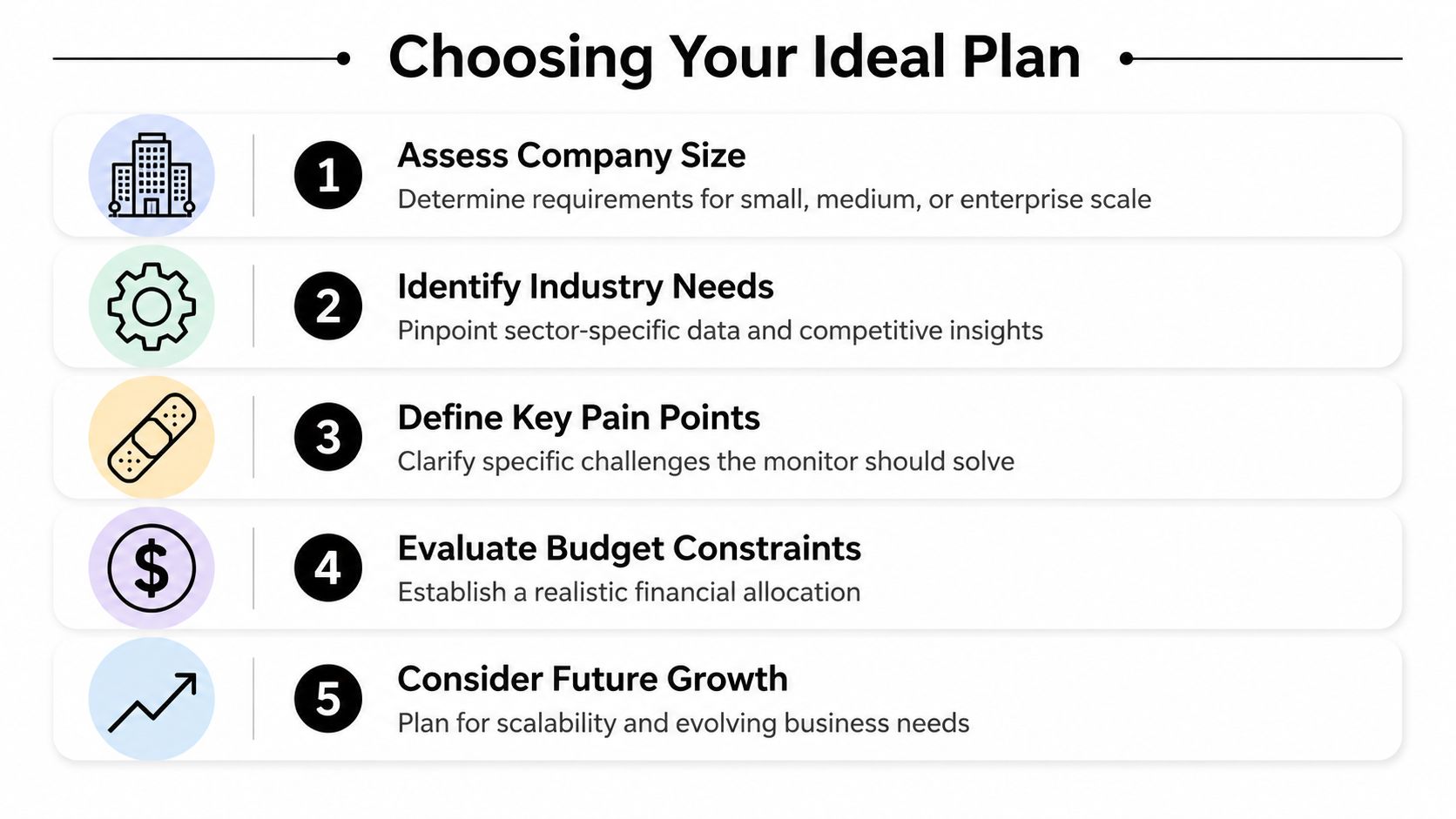
Match the plan to the operating model
A simple framework helps.
When Pro is usually the better fit
Pro is the better fit when monitoring scope is focused and the organization has one dominant use case. That might be a single-brand team watching a contained keyword set, or a company validating whether a specialized monitoring workflow is necessary before expanding.
This plan works best when the team can define tight priorities and won’t immediately need broad keyword expansion or multiple specialized modules.
When Ultimate makes more sense
Ultimate is easier to justify when several teams need coverage or when the brand architecture is more complex. A company with multiple product lines, multiple geographies, or a mix of brand-defense and competitor-observation goals usually benefits from the larger capacity because planning becomes less constrained.
The practical value is not just more keywords. It’s fewer coverage compromises.
When modular pricing is unavoidable
If your issue involves repeated trademark abuse, affiliate governance, or broader market intelligence needs, the base tiers may only get you into the ecosystem. The optimal fit may require Brand Protection, SEM Insights, Ad Armor, or Lighthouse.
That’s the point where you should stop asking, “Which plan should we buy?” and start asking, “Which operating problem are we funding?”
Decision test: If the problem owner is legal, affiliate, or brand protection rather than SEO alone, assume the base plan may not be the final number.
Build a procurement-grade justification
A good business case for the search monitor pricing should include four parts:
Risk statement
Define the business problem in operational language. Not “we need better visibility,” but “we need documented monitoring of trademark bidding and affiliate violations.”Scope statement
List brands, markets, teams, and workflows that need coverage. This prevents under-buying.Response model
Name who receives alerts and what action follows. Software without a response path becomes shelfware.Budget scenario
Separate base subscription, likely modules, and possible growth costs so finance can see the difference between entry spend and expected spend.
The best buyers also pressure-test whether the requirement is current or emerging. If your team is still building process discipline, a smaller start may be wise. If violations are already affecting channel strategy, under-buying creates a false economy.
Frequently Asked Questions About Billing and Contracts
Does The Search Monitor offer a free plan
No public source in the verified data indicates a free plan. The available information says there is no free tier, and that a free trial is available based on the publicly referenced listings cited earlier.
Is pricing transparent for every product
No. The base plans are publicly visible through third-party listings, but the broader platform clearly involves modular pricing and custom quoting for fuller deployments. That means many buyers won’t know their likely total spend until they describe their use case in a sales conversation.
Are add-ons optional
Sometimes yes, sometimes no. They are optional only if your use case can be solved by the base tier alone. If your internal requirement is specifically brand protection, SEM intelligence, industry data, or more advanced abuse detection, then the related modules may be functionally required even if they’re sold as add-ons.
What should you ask on the sales call
Go in with procurement questions, not just product questions:
- Coverage fit: Which plan and modules are required for our exact use case?
- Keyword planning: How should we model our keyword scope from launch through expansion?
- Crawling charges: When do they apply, and how are they estimated?
- Bundle logic: Is a custom package more economical than stacking modules one by one?
- Trial scope: What exactly is included in the free trial, and what is excluded?
Are annual discounts or contract lengths public
The verified public data provided here does not include contract length details, annual prepayment discounts, or cancellation terms. Treat those as open procurement questions. Don’t assume flexibility. Ask for the terms in writing.
What’s the safest budgeting approach
Use a two-layer budget. First, model the minimum viable starting configuration. Second, model the likely operating configuration once all stakeholders have defined what they need. If those numbers are too far apart, your organization may need a phased rollout instead of a full deployment.
The teams that buy well in this category don’t focus on the headline plan name. They focus on whether the contract matches the problem they are trying to control.
If your team is also trying to understand how your brand appears in AI-generated answers, promptposition gives you a separate visibility layer that The Search Monitor isn’t built to cover. It helps marketing and brand teams track how leading AI models present their company, compare visibility against competitors, review wording and sentiment, and identify the sources shaping those answers. That’s useful when your search strategy now has to account for both classic SERPs and the new AI answer layer.