How to Find All Pages on a Website (7 Proven Methods)

You usually discover the problem late.
A sales lead asks why a competitor keeps showing up in ChatGPT answers for a category term your team has covered for years. Someone checks the cited source and finds a page on that competitor’s site nobody on your team had ever seen. It isn’t in their nav. It doesn’t rank prominently in normal search. But it exists, it’s crawlable, and it’s influencing how AI systems talk about the market.
That’s why how to find all pages on a website isn’t just a housekeeping task anymore. It’s a visibility problem, a governance problem, and increasingly an AI search problem.
Page discovery is often still treated as a one-off SEO cleanup. Find some 404s, resubmit a sitemap, run a crawler, done. That workflow is too shallow for modern sites, especially when old resources, support docs, campaign pages, filtered category URLs, and semi-hidden content can all become part of your public footprint.
Why Finding Every Page Matters More Than Ever
A complete URL inventory used to matter mostly for migration work, technical SEO audits, and content pruning. It still matters for all of that. But the stakes are broader now because your site’s overlooked pages can shape search snippets, referral traffic, and AI-generated answers.

Hidden pages still influence perception
Marketing teams often know the homepage, product pages, current blog, and active landing pages. They usually don’t know every retired guide, old PDF hub, legacy subfolder, support article, campaign microsite, or thin location page that still resolves.
That gap matters because search engines and AI systems don’t care whether a page is part of your current messaging plan. If it’s accessible, indexable, and useful enough to surface, it can become the version of your brand that people see.
Practical rule: If a URL can be fetched, it can affect visibility.
Modern sites make discovery harder
The old assumption was simple. Crawl the site from the homepage and you’ll get a reliable list. That assumption breaks on many modern builds.
A cited summary in the provided research states that a 2026 Ahrefs study on crawlability gaps found that 60% of modern websites use client-side rendering frameworks like React, which means many pages can be invisible to basic crawlers unless JavaScript is rendered, according to Link-Assistant’s write-up on finding website pages.
That is the blind spot a lot of teams miss. The page exists for users. It may even be visible to Google after rendering. But your quick crawler, your sitemap export, or your spreadsheet from last quarter won’t show it.
AI search raises the cost of incomplete audits
If you’re auditing for LLM visibility, page discovery becomes the first layer of source control.
You can’t evaluate which pages deserve refreshes, which assets are sending mixed signals, or which competitor URLs keep getting cited if your own inventory is incomplete. The page list is the foundation. Without it, every downstream decision is partial.
A strong audit asks questions like these:
- Which URLs are live and still returning a usable page?
- Which pages are indexable but absent from the sitemap?
- Which pages exist only in logs or CMS exports?
- Which dynamic URLs appear only after rendering?
- Which old pages still contain language that AI systems might quote out of context?
Organizations don’t need one magic tool. They need a layered discovery process that starts with quick wins, then moves toward the sources of truth.
Foundational Discovery Methods for Quick Wins
Start with the easiest signals first. They won’t give you a perfect inventory, but they’ll give you direction fast.
Check sitemap.xml and robots.txt first
The XML sitemap is the site owner’s declared list of important URLs. It’s rarely complete, but it’s still the quickest place to begin.
Use this sequence:
- Visit
/sitemap.xmlon the domain. - If nothing obvious appears, open
/robots.txt. - Look for
Sitemap:lines in robots.txt. - If you find a sitemap index, open each child sitemap.
- Export every listed URL into a spreadsheet.
This step tells you what the site intends search engines to prioritize. It also exposes patterns. You may see separate sitemaps for products, blog posts, categories, images, or regional folders.
Robots.txt helps because many teams forget the sitemap location but still declare it there. It’s also a quick way to spot blocked paths you may want to investigate later.
Use search operators, but don’t trust them as a full count
A site:domain.com search in Google or Bing is useful for reconnaissance. It can reveal subfolders, old pages, unusual templates, and content types you didn’t know existed.
It’s especially useful for competitor research when you don’t control the site.
Still, treat search operators as directional, not definitive. They show a public view of indexed content, not the whole live site. They also tend to miss pages that exist but haven’t been indexed, or pages buried behind weak internal linking.
If you’re doing early-stage discovery, Bruce and Eddy’s guide on how many pages are on your website is a practical companion because it frames the counting problem the same way organizations encounter it in real audits.
For static sites, Wget is a fast low-friction option
If the site is mostly static and link-based, a command-line crawl can go much further than manual clicking. The provided data notes that Wget can mirror a site and discover pages with 95% success on static sites using a recursive command, as described in SE Ranking’s walkthrough of finding all pages on a website.
That makes Wget useful when you want a rough but efficient URL set without opening a desktop crawler.
Use it when the site has:
- Simple internal linking with standard HTML links
- Minimal JavaScript dependency
- Predictable subfolder structure
- No need for deep rendering diagnostics
Don’t use it as your final answer on a modern app-like site.
What these quick methods do well
These methods are valuable because they’re fast, public, and easy to repeat.
They help you answer questions like:
- What does the site publicly expose?
- What does the site claim is important?
- Which folders or templates show up immediately?
- Where should a deeper crawl begin?
They also help non-technical teams get traction before engineering gets involved.
For teams building a broader workflow around AI visibility, it’s worth pairing classic discovery with content review processes like those described in this guide on https://www.promptposition.com/blog/how-to-use-ai-for-seo/ so the URL list feeds into an actual optimization plan rather than sitting in a spreadsheet.
Go Straight to the Source with Webmaster Tools
Public discovery tells you what’s visible from the outside. Webmaster tools tell you what search engines have encountered.
That difference is where the useful gaps show up.
Read the Pages report like an auditor
In Google Search Console, the Pages report is one of the best places to uncover URLs your team has forgotten. Don’t just look at indexed totals. Open the categories underneath.
The most useful buckets are usually:
- Indexed pages that confirm what Google is serving.
- Discovered, currently not indexed URLs that exist but haven’t made it into the index.
- Crawled, currently not indexed URLs that Google fetched but chose not to keep.
- Excluded variants that reveal duplicate, alternate, or parameter-driven versions.
These reports often surface pages that aren’t obvious from navigation, aren’t consistently linked internally, or sit in odd corners of the CMS.
Reconcile sitemap exports against GSC exports
True value appears when you compare sets rather than reading one interface in isolation.
Take your sitemap URL list and compare it against exported GSC page data. The provided data states that reconciling a site’s XML sitemap with the Google Search Console Coverage report helps identify orphan pages, and 15-25% of websites have these pages, meaning URLs appear in sitemaps or logs but not in Google’s indexed set.
That’s a serious visibility gap. A page can exist in your ecosystem without participating in search performance the way you expect.
A simple reconciliation process works well:
| Source set | What it tells you | What to look for |
|---|---|---|
| Sitemap only | Intended important pages | Missing index coverage, stale URLs |
| GSC only | URLs Google found independently | Hidden templates, old pages, alternate paths |
| In both | Core crawlable inventory | Priority pages to validate and optimize |
A page missing from the sitemap isn’t necessarily a problem. A page missing from both the sitemap and your internal awareness usually is.
Why this matters beyond classic SEO
Teams often focus on GSC only when traffic drops. That’s too late.
If you care about AI search visibility, these “not indexed” and “excluded” clusters can reveal pages that deserve cleanup, consolidation, or stronger internal linking before they create confusion. They can also expose assets Google knows about even when your content team doesn’t actively manage them.
Bing Webmaster Tools can add another layer, especially when you want a second search engine perspective. The labels differ, but the workflow is similar. Export URL data, compare sets, and investigate mismatches.
If your site still isn’t surfacing where expected, this resource on https://www.promptposition.com/blog/why-doesnt-my-website-show-up-on-google/ is useful because it connects indexing symptoms to the underlying technical causes teams usually miss in audits.
What GSC won’t solve by itself
Search Console is strong, but it isn’t your complete inventory.
It won’t reliably replace:
- full-site crawling for internal link graph analysis
- server logs for request history
- CMS exports for editorial reality
- rendered crawling for JavaScript-heavy experiences
Use it as an evidence source, not a substitute for crawling.
Deploying Website Crawlers for a Full Site Audit
When teams ask me for the most dependable method, this is usually the answer. A proper crawler is the workhorse.
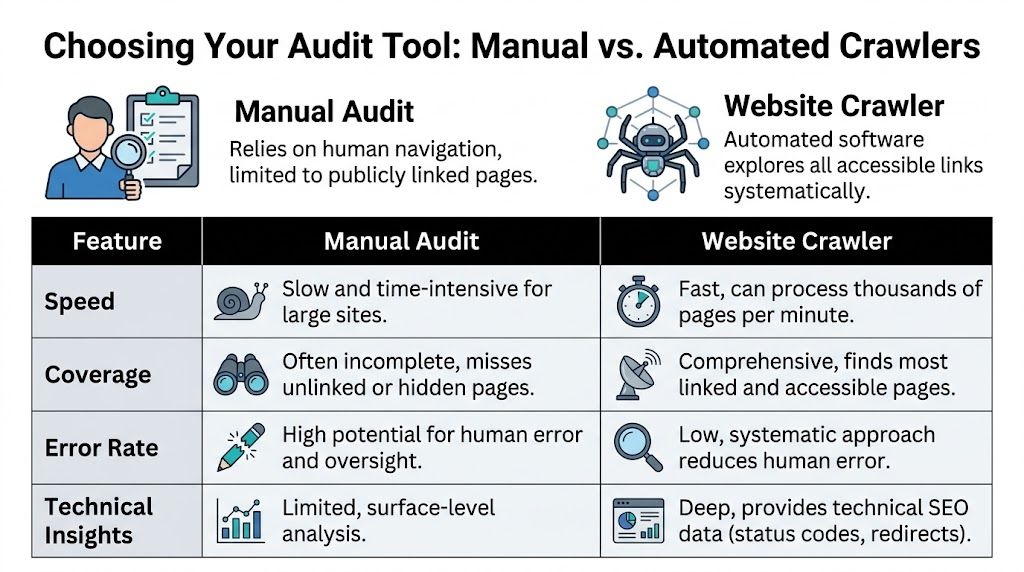
Tools like Screaming Frog, Sitebulb, and similar platforms simulate a search engine crawler. They start with a seed URL, fetch the page, extract internal links, and continue until they run out of paths or hit your configured limits. That gives you a structured inventory, plus the technical context around each URL.
A crawler does more than list URLs
A good crawl tells you not just that a page exists, but also:
- Status code such as 200, 301, or 404
- Canonical behavior and duplicate signals
- Internal link counts and crawl depth
- Title and meta data for content review
- Response patterns that hint at blocked or thin sections
That context matters because a giant raw URL export isn’t very actionable by itself. You need to know which pages are live, which pages redirect, which pages are weakly linked, and which areas of the site require rendering.
Configure the crawler for the site you actually have
Many audits fail when teams run default settings against a modern site and assume the output is complete.
For a static marketing site, defaults may be enough. For a JavaScript-heavy site, they usually aren’t.
Before you run the crawl, decide:
- Do you need JavaScript rendering? If key content loads client-side, enable rendering.
- What is the crawl scope? Root domain only, or subdomains too?
- Will parameters explode the crawl? Add exclusions or normalization rules.
- Do you need to honor robots directives? Usually yes for standard audits, though investigative work may differ.
- Should the crawl be seeded with a list? Starting from sitemap URLs often improves completeness.
If you’re scraping or crawling at scale, the operational side matters too. ScreenshotEngine’s guide to Modern Web Scraping Best Practices is worth reviewing because it covers the practical issues that turn a clean audit into a noisy one, especially around consistency, rate handling, and rendering behavior.
Manual review versus crawler-driven audit
The trade-off is simple. Manual review gives you context but poor coverage. Crawlers give you scale and structure.
| Method | Completeness | Speed | Technical Skill | Best For |
|---|---|---|---|---|
| Manual browsing | Low to moderate | Slow | Low | Small sites, quick reconnaissance, spot checks |
| Sitemap review | Moderate | Fast | Low | Initial URL gathering, validating intent |
| Search Console export | High for known search engine discovery | Fast | Moderate | Indexing audits, finding hidden URLs Google knows |
| Desktop crawler | High on accessible linked pages | Fast | Moderate | Full technical audits, internal link analysis |
| Command-line crawl | Moderate to high on simpler sites | Fast | High | Technical users, static site mapping |
A short demo helps if your team hasn’t used crawler software before.
Where crawlers struggle
Crawlers are powerful, but they aren’t omniscient.
They commonly miss:
- Orphan pages with no crawl path
- URLs hidden behind internal search or forms
- JS states that require interaction
- Pages available only from logs, APIs, or CMS exports
- Areas blocked by robots.txt or authentication
That’s why a crawler should be your central method, not your only method.
Field note: If a crawl result feels “too clean,” it usually means the setup was too shallow.
For teams evaluating software in this area, https://www.promptposition.com/blog/ai-seo-software/ is a useful read because it helps frame which platforms support discovery work versus broader reporting and monitoring.
Advanced Tactics for Uncovering Every Last Page
If you need an exhaustive URL inventory, you have to move past surface crawling. Technical SEO then becomes investigative work.

Server logs are the closest thing to ground truth
A crawler shows what it can discover. Server logs show what was requested.
That distinction matters. A page may have no visible crawl path today and still appear in logs because a bot, user, old link, feed, or AI retrieval system requested it recently. That makes logs one of the best ways to uncover forgotten URLs.
Look for:
- Requested paths returning 200 or 301
- Old campaign URLs still receiving traffic
- Bot-accessed documents or support pages
- Legacy folders that no longer appear in navigation
- Subdomains the marketing team doesn’t actively track
Log analysis is messy. Bot noise, asset requests, and repeated variants can overwhelm the useful data. Filter aggressively and focus on HTML page requests first.
Pull from the CMS and internal search data
A surprising amount of hidden content isn’t hidden technically. It’s hidden organizationally.
The CMS may contain:
- unpublished but accessible pages
- archived resources still live on public URLs
- old landing pages detached from campaigns
- category or tag pages generated automatically
- language or regional variants nobody owns anymore
Internal site search reports can also expose valuable patterns. If users repeatedly search for topics that land on odd pages, those pages deserve review. In large content estates, internal search often surfaces templates and article clusters that don’t stand out in normal crawls.
Build your own Python crawler when you need control
Desktop crawlers are faster to deploy. A custom crawler gives you control over scope, rules, exports, and integration.
The provided technical guidance outlines a practical pattern:
- Install prerequisites with
pip install requests beautifulsoup4 - Write helper functions to detect internal links and normalize relative URLs
- Traverse with a queue or stack using BFS or DFS
- Track visited URLs in a set
- Respect robots.txt and apply limits to avoid runaway crawls
The same guidance notes that a custom Python crawler can achieve 90-95% coverage on static, link-based websites, but this drops to 60% on JS-heavy sites without browser automation, and orphan-page discovery is less than 20% without sitemap seeding, according to IProyal’s crawler walkthrough.
That tells you exactly where custom scripts fit. They’re excellent for controlled environments and targeted investigations. They are not enough on their own for modern front-end frameworks unless you add rendering through Selenium, Playwright, or Puppeteer.
Here’s the strategic lesson. If your crawl starts only from the homepage, you are assuming the site’s internal linking is complete. It usually isn’t.
Seed advanced crawls with sitemap URLs, known high-value folders, and any GSC export you have. That reduces false confidence.
The practical stack for exhaustive discovery
If I needed the strongest possible URL inventory, I’d combine methods like this:
| Layer | Why it matters | What it catches |
|---|---|---|
| Crawler | Core linked architecture | Navigable pages, technical issues |
| Sitemap export | Declared important URLs | Pages absent from nav but intended for discovery |
| GSC export | Search engine known URLs | Indexed and discovered pages outside crawl paths |
| Server logs | Historical and real requests | Orphans, legacy pages, bot-visited URLs |
| CMS export | Editorial inventory | Unmanaged or detached content |
That’s the digital archaeology approach. No single source gives you the whole site. The complete picture appears only when you merge the sources and investigate the gaps.
Creating a Master List and Monitoring Your Footprint
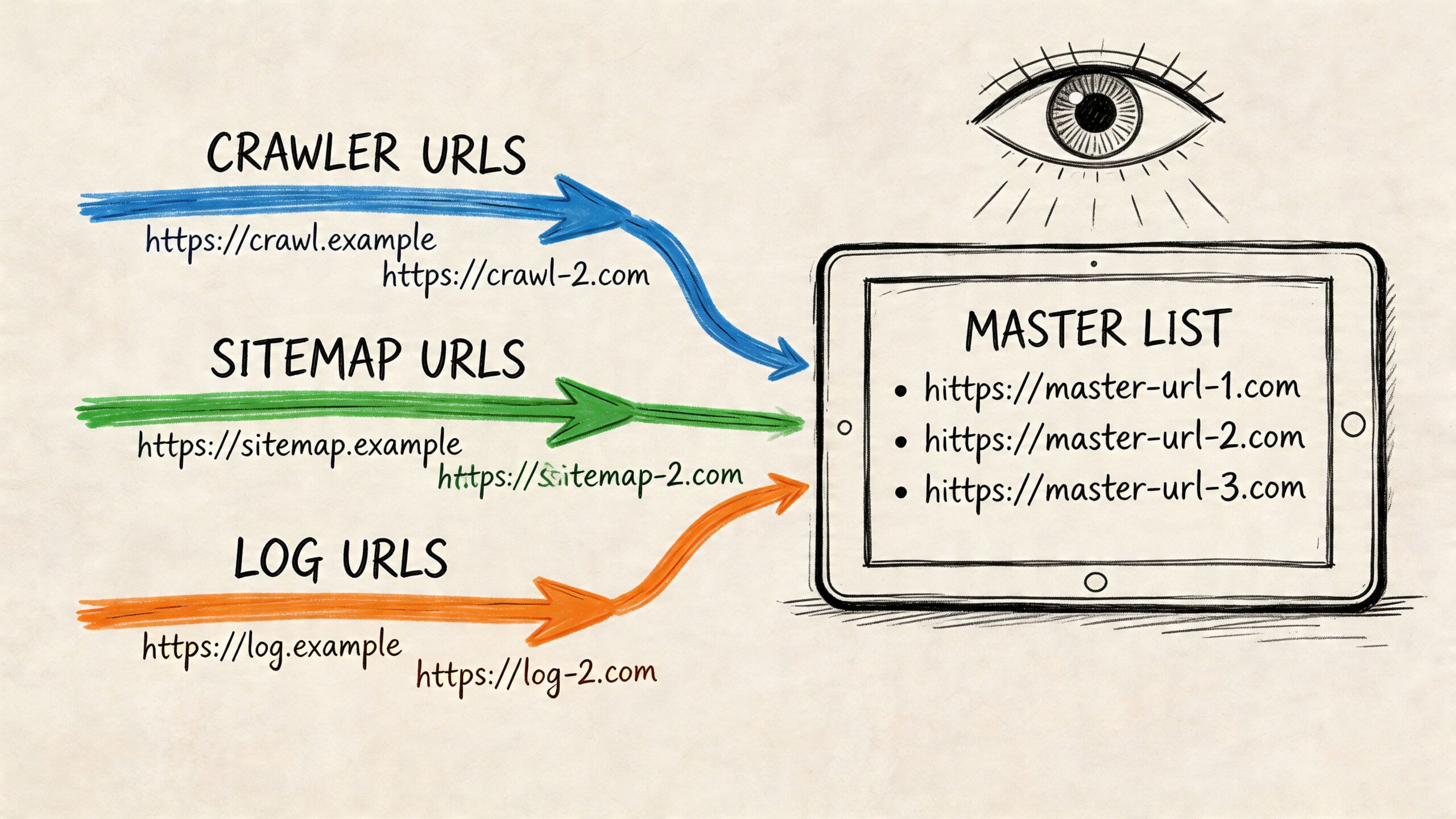
Once you’ve gathered URLs from crawlers, sitemaps, webmaster tools, logs, and the CMS, the crucial step is consolidation. Organizations often stop too early and keep separate exports in separate folders. That creates confusion fast.
Build one canonical spreadsheet or database
Your master list should have one row per normalized URL.
At minimum, include columns for:
- URL
- Source found such as sitemap, crawl, GSC, log, CMS
- Current status code
- Canonical target
- Indexability
- Content type or template
- Owner or team
- Action needed
Normalization matters. Decide early how you’ll handle trailing slashes, protocol variations, uppercase paths, and parameters. If you don’t, deduplication becomes unreliable.
Verify every URL state
After deduplicating, validate the current state of each URL.
Focus on these outcomes:
- 200 OK means the page is live and needs quality review.
- 301 redirect means you should record the target and decide whether to keep the source in monitoring.
- 404 or 410 means the URL may still exist in old systems, links, or citations, even if the page is gone.
- Blocked or noindex pages may still matter operationally if they are public-facing or cited externally.
Pattern analysis is particularly helpful. Sort by folder, template, or source and look for clusters. You may find that one old campaign folder has hundreds of URLs that still resolve, or that one subdomain has never been included in recurring audits.
Filter noise before you make decisions
Large sites often generate noisy URLs that aren’t useful in a content inventory.
Usually worth separating into their own bucket:
- faceted navigation parameters
- session or tracking parameters
- pagination variants
- search-result URLs
- duplicate print or preview paths
Don’t delete them from the audit blindly. Label them. Some are harmless noise. Some reveal crawl waste or accidental indexation.
Turn the audit into a recurring process
A page inventory is not a one-time deliverable. New pages appear constantly through campaigns, product launches, help center updates, CMS quirks, and engineering changes.
A sustainable process usually includes:
- Scheduled crawler runs
- Regular sitemap and GSC exports
- Periodic log review
- Ownership rules for new URL patterns
- A review loop for pages influencing search and AI visibility
For ongoing analysis, reporting discipline matters as much as discovery. This guide to https://www.promptposition.com/blog/search-ranking-reports/ is useful if you’re trying to connect raw URL findings to a reporting workflow the rest of the marketing team can use.
The important shift is this. You’re not just counting pages. You’re maintaining awareness of your brand’s exposed web footprint.
Frequently Asked Questions
How do I find all pages on a competitor’s website?
You won’t have access to their Search Console, logs, or CMS, so use public methods only.
Start with:
sitemap.xmlrobots.txtsite:searches- a desktop crawler
- manual review of nav, footer, HTML sitemaps, blog archives, and support hubs
For competitor work, I usually trust no single signal. Sitemaps can be selective. Search operators can be incomplete. Crawlers can miss rendered pages or orphaned assets. The right approach is to merge what each method reveals and then inspect the folders and templates that keep recurring.
Why does my crawler miss pages that I know exist?
Usually one of four reasons is responsible.
- No internal links: The page is orphaned.
- JavaScript dependency: The URL or content appears only after rendering.
- Blocked access: Robots rules or authentication prevent crawling.
- Interaction requirement: The page appears only after form input, filtering, or on-page actions.
If you know the URL exists, seed it directly into the crawl list. Then investigate whether the issue is rendering, crawl path, or blocking.
What is an orphan page?
An orphan page is a live URL with no internal link path from the crawl starting point.
That’s why standard crawlers often miss them. Crawlers discover URLs by following links. No link, no path. To find orphan pages, compare crawler output against other sources such as sitemap exports, Google Search Console exports, CMS inventories, and server logs.
What should I do with thousands of parameterized URLs?
Don’t panic and don’t leave them mixed into the main inventory.
Split them into a separate tab or dataset. Group by parameter pattern. Then decide which ones are:
- legitimate crawl targets
- useful faceted pages
- duplicate noise
- tracking or session junk
- internal search pages that shouldn’t be indexed
This step matters because parameter sprawl can make a site look much larger than the meaningful content set is.
Should I include subdomains in the audit?
Yes, if they are part of the brand experience or can appear in search and AI citations.
A lot of teams audit only the main domain and ignore:
- blog subdomains
- help centers
- docs portals
- academy or resource hubs
- regional or campaign subdomains
If users can reach them and models can cite them, they belong in scope.
How often should I repeat this process?
That depends on how often the site changes. Fast-moving content teams need a tighter cadence. More stable sites can review less often.
What matters is consistency. The point is to avoid rediscovering your own site only after a visibility issue, citation problem, or migration surprise has already happened.
If your team wants to move beyond one-off audits and understand which pages LLMs cite, how your brand appears across major AI systems, and where competitors are winning source visibility, promptposition gives you that monitoring layer. It helps marketing teams track AI search presence, review cited sources, and turn an opaque channel into something measurable and actionable.